Twelve effect lanes
Granular, spectral, chorus/flanger/phaser, saturation, looping, filtering, transient, time-stretch, slicing, repeat and tape processing, one lane per row of the grid.
Step-sequenced multi-effect plug-in
A step-sequenced multi-effect: twelve effect lanes — granular, spectral, modulation, saturation, filter, transient, time and tape processing — programmed on a 32-step grid. Each lane processes only on the steps painted for it, while per-step values, five modulators per lane, a global matrix and four macros shape every parameter.
Overview
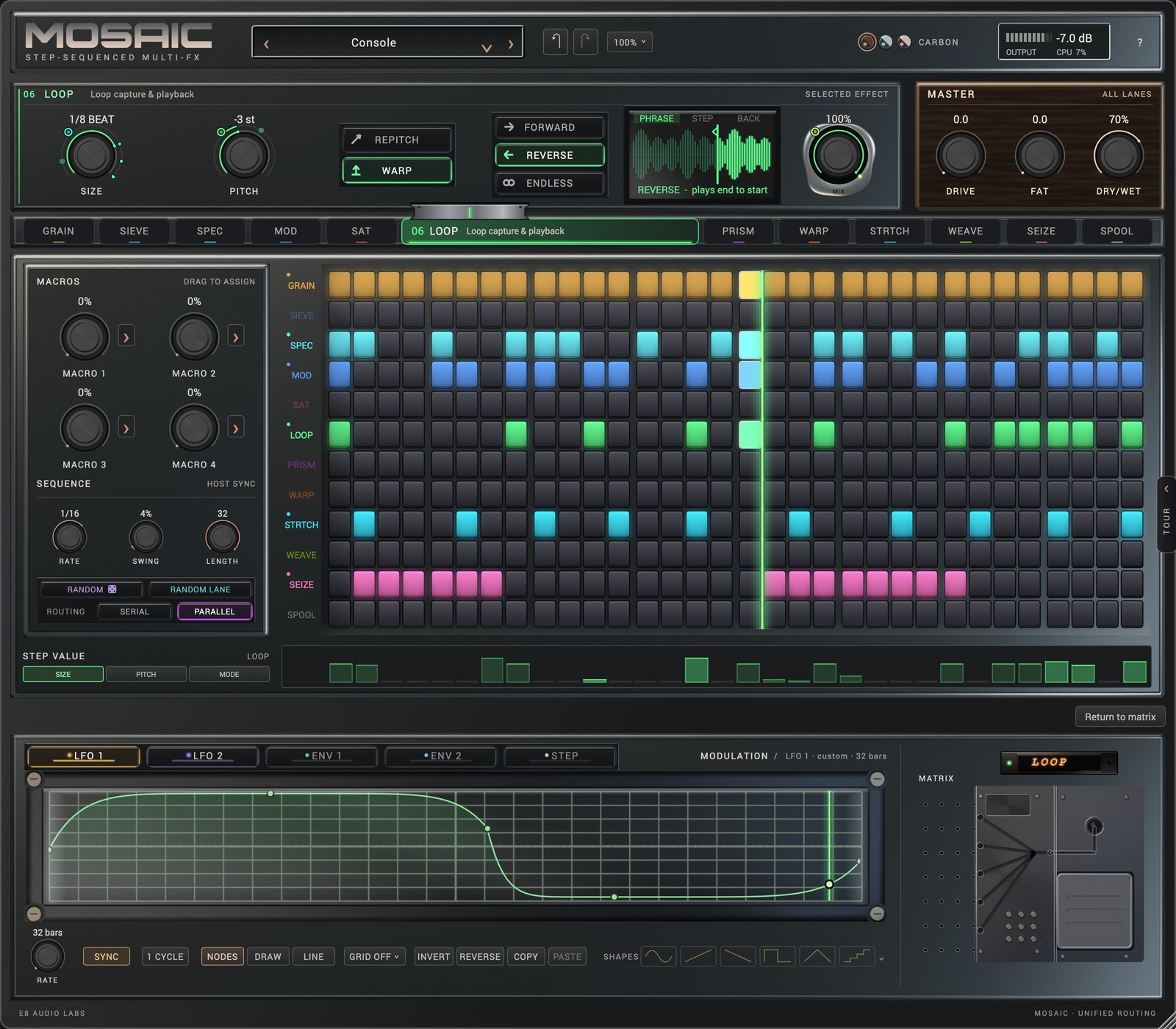
MOSAIC arranges its processing as a step sequence. Each effect occupies a lane of the grid, and the grid determines when each one is heard.
Granular, spectral, chorus/flanger/phaser, saturation, looping, filtering, transient, time-stretch, slicing, repeat and tape processing, one lane per row of the grid.
Each lane processes only on its painted steps and passes audio untouched on the rest. RATE 1/4 to 1/32, LENGTH 2 to 32 steps, global SWING.
Each lane can loop 2, 4, 8, 16 or 32 steps independently, so lanes of different lengths drift against one another and realign: polymeter within a single instance.
LFO 1, LFO 2, ENV 1, ENV 2 and a 16-value STEP sequence, drawn from 40 LFO shapes, node curves of up to 32 points and 40 STEP patterns.
A global matrix of up to 16 sources and 64 routes per bank, with four macros that move several parameters at once.
Run the lanes in a fixed serial order or sum them in parallel. Every lane has its own MIX; the master section adds DRIVE, FAT and DRY/WET.
Web demo
A browser version of the grid. Program the lanes across sixteen steps and press play: a drum loop runs through the effects as the playhead moves. It approximates MOSAIC’s processing rather than running the plug-in’s DSP.
Click cells to turn effect lanes on for those steps, then press Play. The page loops a drum track and applies each lane on its steps. A starter pattern is loaded.
Interface
Select a number to explore each region of the window. The interface scales from 70 to 180% of its design size, or fits the screen, in three skins: Carbon, Mineral and Oxblood.
Preset browser (an edited preset shows “*” after its name), undo and redo, window size (70–180% or fit to screen), the skin selector (Carbon, Mineral, Oxblood), and the output meter with CPU load.
The knob row of the selected lane. Here it shows LOOP: SIZE, PITCH, PITCH MODE, MODE, the loop view with its PHRASE, STEP and BACK trigger keys, and MIX.
DRIVE, FAT and DRY/WET for all lanes. The master section is global to the bank, so switching patterns does not change the overall mix.
Twelve lane keys on a rail under the effect module. The selected key widens to show the lane’s number, name and role, with a bridge up into the module it drives; choosing a key switches the knob row, the step-value band and the modulation deck.
Twelve lanes by 32 steps. A painted cell processes the audio on that step; an empty cell passes it through. The green line is the playhead, which follows the host transport.
Four macros. Drag a macro onto any control to assign it; one macro can move several parameters across lanes.
RATE (1/4 to 1/32), SWING and LENGTH (2 to 32 steps); RANDOM and RANDOM LANE re-roll the pattern or one lane; ROUTING switches between SERIAL and PARALLEL processing.
Per-step values for the selected lane: choose a parameter (here SIZE, PITCH or MODE) and draw its value for each step.
Five modulators per lane: LFO 1, LFO 2, ENV 1, ENV 2 and STEP. Edit the curve with nodes, freehand drawing or lines, or choose one of 40 shapes.
The global routing matrix, shown here closed to its nameplate. Open it for MAP, BANK and HEAT views of up to 16 sources and 64 routes per bank.
The TOUR tab on the right edge opens a guided walk through the window, one region at a time.
Technical breakdown
The processing behind each lane: its algorithm, ranges and latency, and the controls on its knob row as the plug-in labels them.
Granular cloud
A granular cloud built from the live input. Grains stay aligned with one another, so pitched grains hold their tuning and level. GRAIN and SIEVE form a coupled pair: when both run, each steers the other, scaled by COUPLE; at 0 the lane is fully independent.
Spectral gate
A spectral gate that passes only the frequency content standing out from its surroundings, so one threshold behaves the same from the lows to the highs. Open bands hold until they fall well below THRESH, so the gate never chatters, and RING sustains each band’s loudest moment as it decays.
Spectral freeze
Holds the spectrum of whatever is playing as a sustained sound, keeping every held partial at its own pitch so frozen chords stay in tune. FREEZE crossfades from pass-through to a full hold, and BLUR spreads and gently detunes the held partials so a hold shimmers. HOLD freezes what is playing; HIT freezes the hit that opens each step.
Chorus, flanger, phaser
Chorus, flanger and phaser in one lane. All three keep running and are level-matched, so a MODE change, even on a single step, crossfades smoothly instead of dropping out.
Multipolar saturator
A saturator that treats the positive and negative halves of the wave differently: ASYM adds even harmonics, and TONE decides which frequencies saturate rather than equalising the result. Output is level-matched for every curve, so hits keep their punch and nothing pumps.
Tempo-synced looper
A tempo-synced looper. Every wrap of the loop is crossfaded the way a sampler loops, so seams never click, even at 1/16 beat. TRIG decides what starts a loop: the top of the pattern, the lane’s own step, or the audio just before the step.
Filter suite
Three resonant filter characters under one CUTOFF and RESO pair: LADDER, a saturating four-pole ladder whose resonance stays in tune and self-oscillates; MODAL, a bank of ringing resonators; and DIFFUSE, which delays the frequencies around CUTOFF so a hit smears into a chirp.
Transient designer
Transient shaping that measures each hit against what was already playing, so a hit over a bed is shaped like a hit from silence and nothing is missed. ATTACK and SUSTN shape the hit and its tail; WARP smears each onset into a whoosh.
Granular time-warp
Time-warps the most recent input at musical ratios, with a hold at the centre of the knob, and the read head restarts whenever one of the lane’s steps opens. PITCH transposes independently of speed, and held tones keep their pitch at every ratio.
Beat re-sequencer
A beat re-sequencer locked to the host bar line and the sequencer’s SWING. ALGO arranges the bar’s slices from rhythm templates of rising complexity, while STUTTER and REVERSE add repeats and reversals. With nothing turned up, WEAVE is transparent.
Capture-repeat
A beat repeat shaped by a curve you draw across one cycle. CYCLE and DIV set the grid, and GRAB sets how much of each cycle replays a seized slot instead of playing live. With GRAB centred and a flat curve, the lane is perfectly transparent. The BENCH is the full-width curve editor.
Failing tape transport
A tape machine that can be told to fail. SPEED runs from reverse through a braked stop to play, with pitch following speed. DAMAGE sets how often the transport fails, and the failures repeat identically on every loop pass; WEAR adds braking time, wow, flutter and motor sag.
Signal path
In SERIAL mode the lanes process in the fixed order below; in PARALLEL mode their outputs are summed. The master section follows in both.
Factory library
Each preset is a bank of twelve patterns, casting five or six lanes and running two to four at a time. The four macros hold the same role in every preset.
Updates
The changes in each MOSAIC build since 0.1.3, newest first. Builds marked “In testing” are with testers and are not yet the download.
Specifications
Waitlist
Get release news about MOSAIC by email.
We use your email only for product updates. See our privacy policy.