TEMPER

Physical modeling instrument

Strings · Bars · Plates · Membranes · Bells

TEMPER is a carefully calibrated physical modeling engine. Six exciters — strike, pluck, noise, contact, felt hammer and bow — drive a string coupled at a bridge to a surface, from strings and bars to plates, membranes and bells, with every voice resonating through one shared body. Its 115 factory programs span fourteen families, each shown as a picture of its own instrument.

Anchored tuning calibrates the coupled model to pitch, three quality modes balance detail against CPU, and material memory lets the instrument respond to how it has been played. The Stage seats whole sections of players in a hall under a conductor, and Orchestrate scores one played line or chord across them. Four macros on the front panel, a full-screen modulation page and an eleven-module effects rack complete the instrument.

  • AU
  • VST3
  • Standalone
  • TEMPER FX
  • v0.1.35
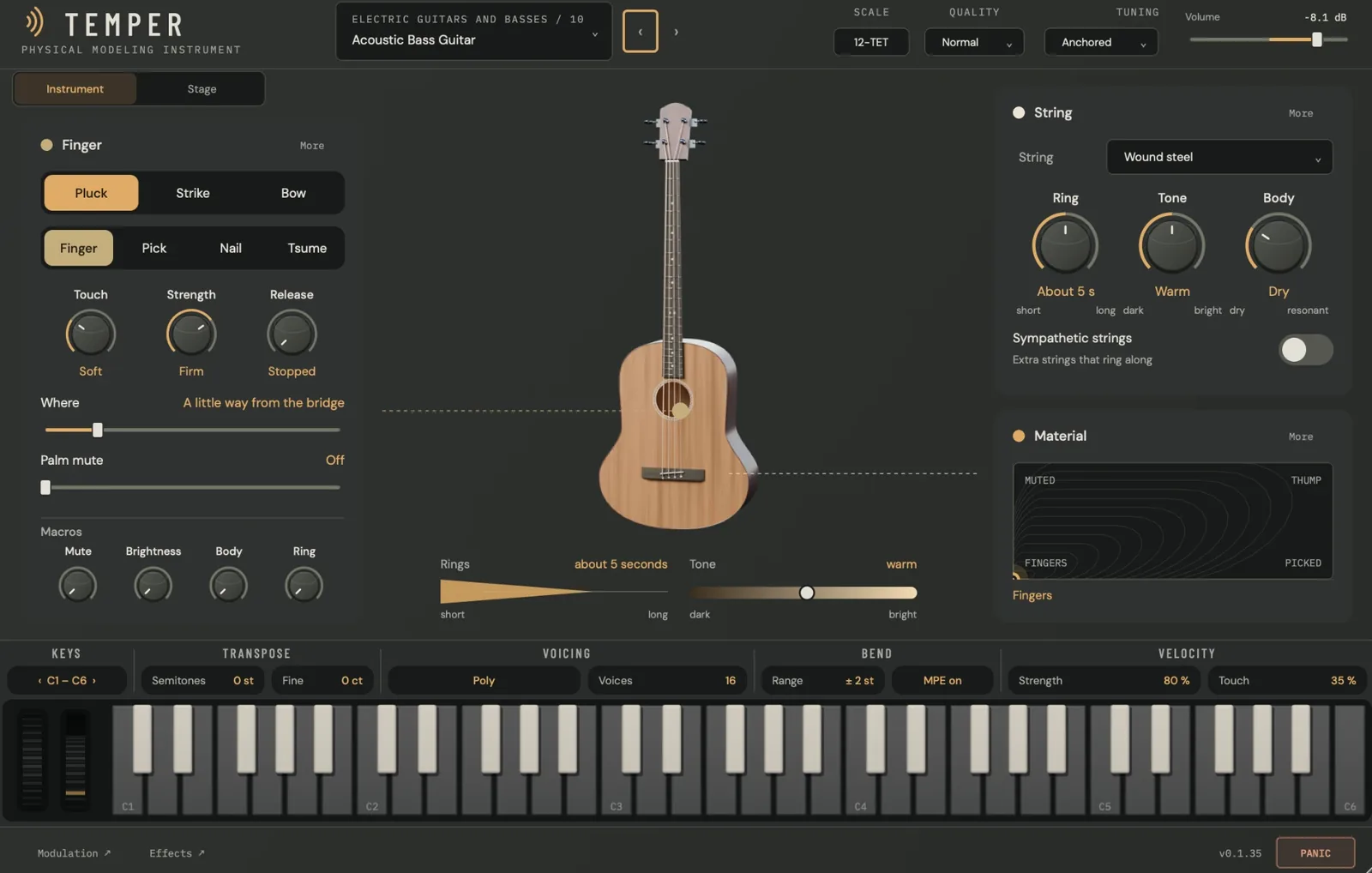
The TEMPER editor playing Acoustic Bass Guitar: the Finger card with Pluck, Strike and Bow, Finger, Pick, Nail and Tsume, Touch, Strength, Release, Where, Palm mute and the Macros row on the left; the bass guitar in the middle with Rings and Tone below it; the String card and the Material pad on the right; the keyboard strip along the bottom
The instrument How it is played on the left, a picture of the instrument in the middle, and the string and the material pad on the right.
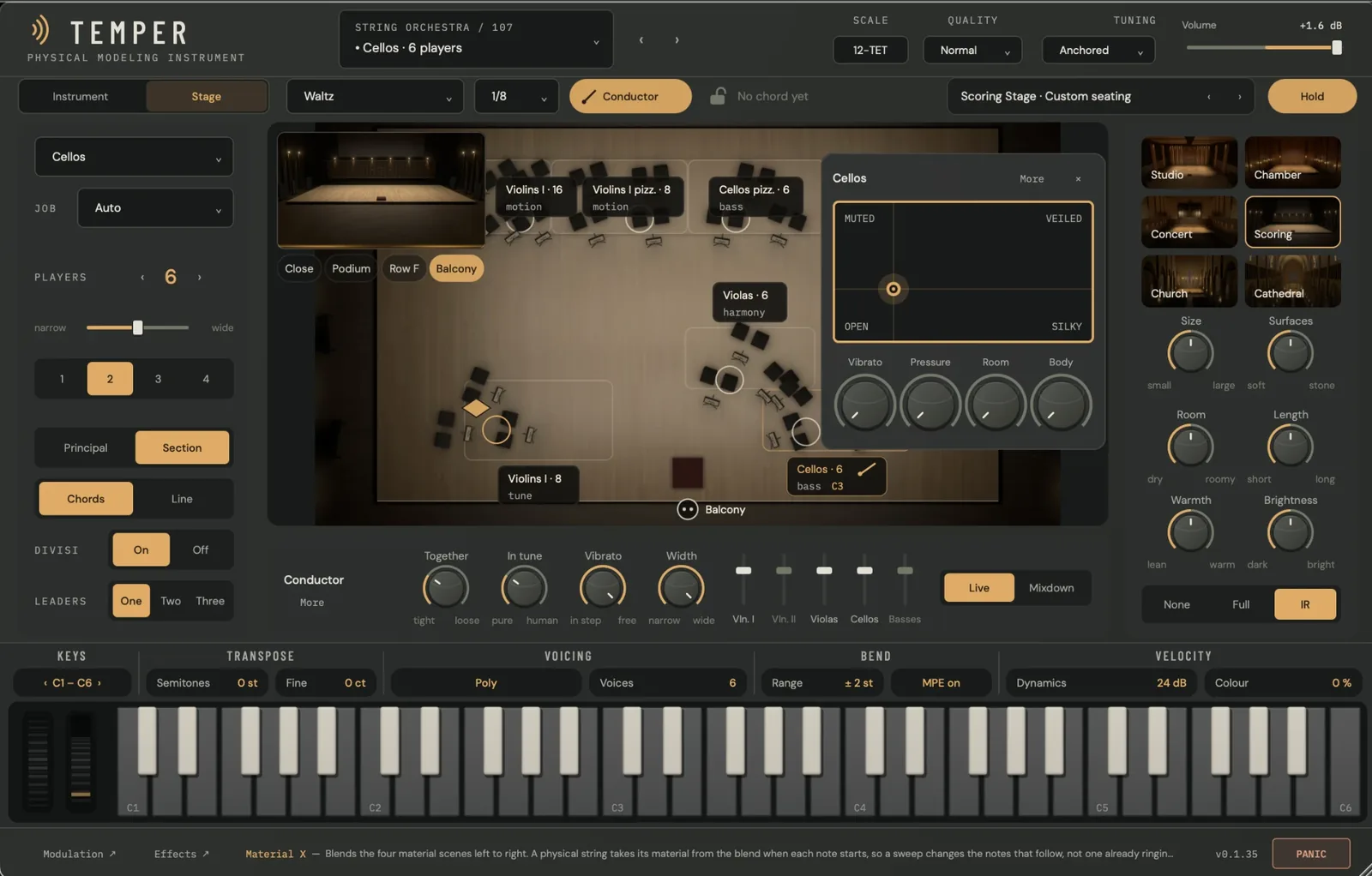
The TEMPER Stage on Cellos · 6 players: the section's controls on the left, the seating chart of a string orchestra in the middle with the Cellos card open, the conductor below it, and the halls and their acoustics on the right
The Stage Sections seated in a hall, heard from your seat, with a conductor and Orchestrate.
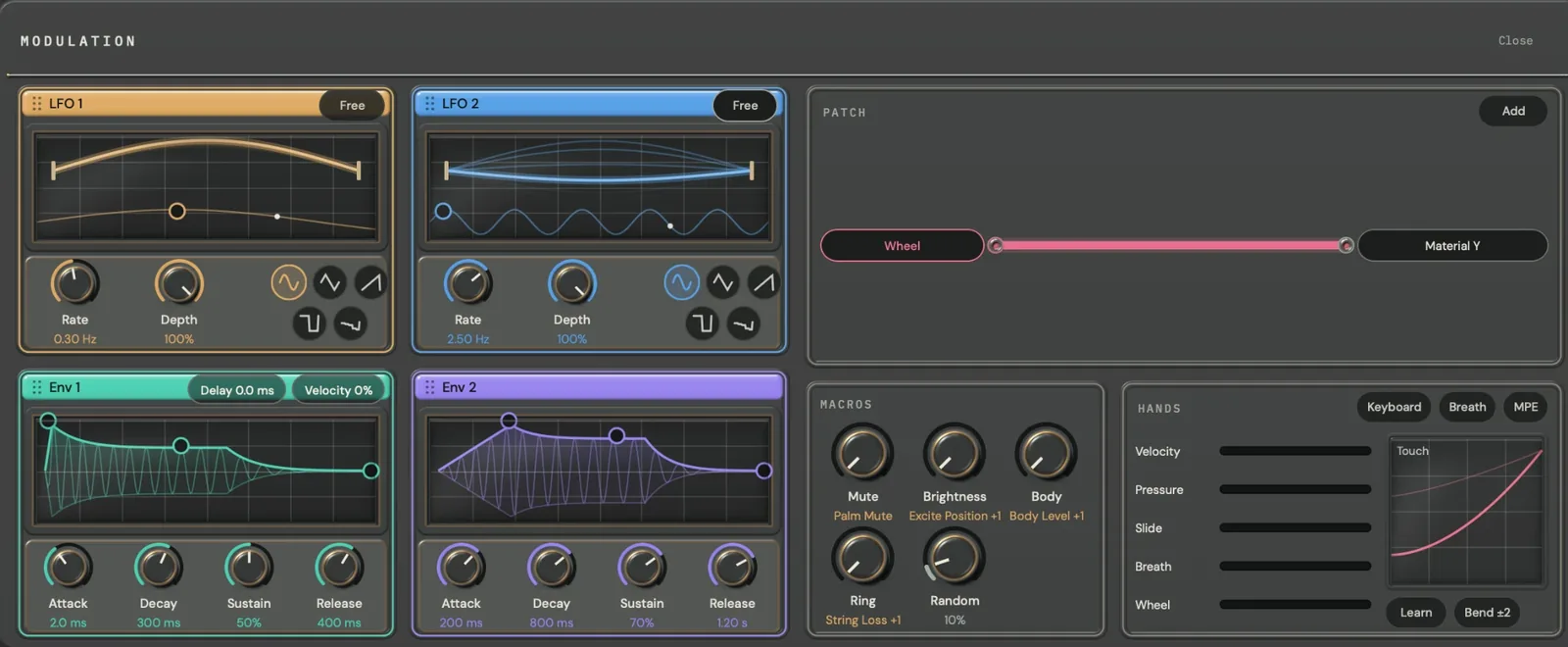
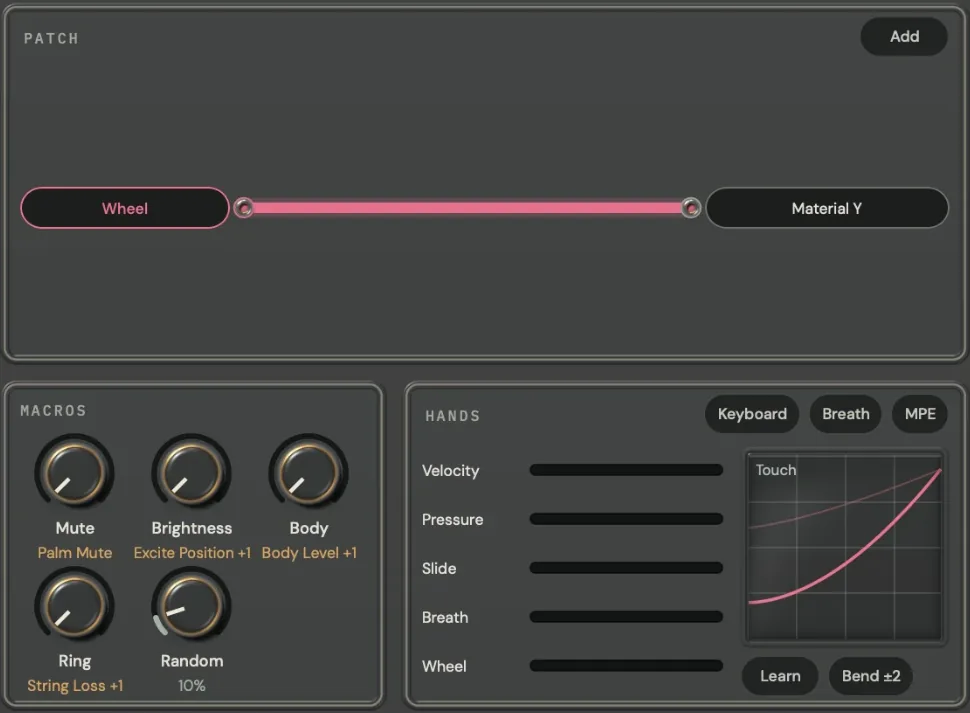
The TEMPER Modulation page: LFO 1 and LFO 2 and Env 1 and Env 2 with their live displays and knobs on the left; the Patch with a cable from Wheel to Material Y, the Macros and Hands on the right
Modulation Two LFOs and two envelopes drawn live, a patch of cables, the macros and the hands, on one page.
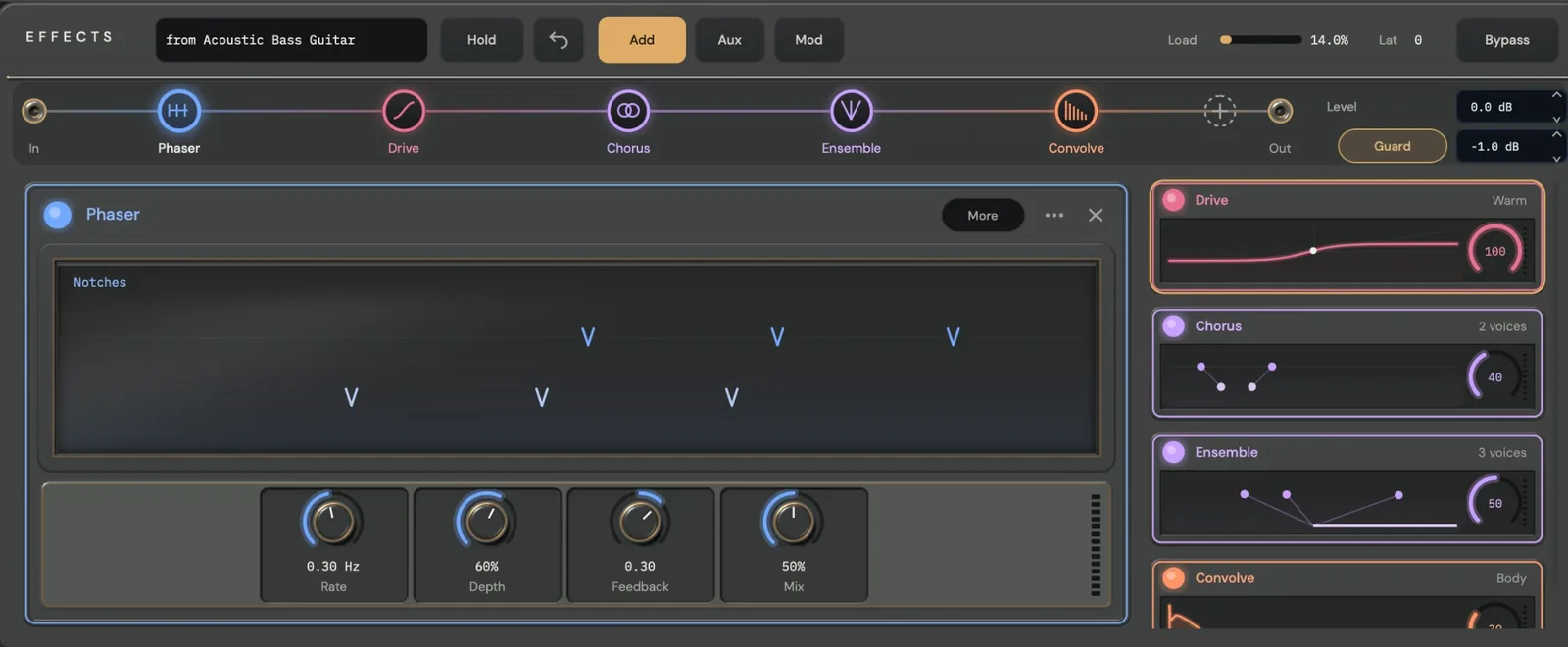
The TEMPER Effects page: the chain rail from In through Phaser, Drive, Chorus, Ensemble and Convolve to Out, the Phaser open with its graph and Rate, Depth, Feedback and Mix, and tiles for the other modules
Effects A reorderable chain, the selected module on one large graph, and live tiles for the rest.

Overview

What TEMPER does

TEMPER is played from MIDI and uses no recordings. You choose the instrument, what it is made of and how it is played, and every note is modelled as you play it.

01

A picture of every instrument

Each of the 115 programs shows a photoreal picture of its own instrument, with the point where the note is played marked on it.

02

Played in plain words

Pluck, Strike or Bow; finger, pick, nail or tsume; Touch, Strength, Release and Where. Every value reads as a musician would say it.

03

The material pad

Every program has two named axes and four named corners to blend between. The home corner is the preset as voiced, and the mod wheel moves the vertical axis.

04

Macros on the front panel

Each program’s four macros sit under the playing controls, named for what you hear, such as Mute, Brightness, Body and Ring.

05

The Stage

Bowed and plucked programs play as sections of up to 16 players, seated in one of six halls with a conductor. Orchestrate turns one played line or chord into a part for every section.

06

TEMPER FX

The effect version puts the same instruments on an audio track: Free Running rings under the input, and MIDI Gated sounds only through the notes you hold.

Instrument

The instrument page

One page per program, drawn for the instrument it plays. Select a number to explore each region. The window opens at 1160 × 740 and resizes from 900 × 600 to 2200 × 1400.

The TEMPER editor playing Acoustic Bass Guitar, with numbered markers over its regions
  1. The preset box shows the family and program number above the name; click it to open the Library, or step with ‹ ›. Scale opens the tuning menu, with Scala files and MTS-ESP. Quality is Eco, Normal or High, Tuning is Anchored or Free, and Volume sets the output level.

  2. Two pages for a program that can play as a section: the instrument itself, and its section on the Stage.

  3. The card is named for what plays the note, here Finger. Choose Pluck, Strike or Bow and the tool, set Touch, Strength and Release, then Where along the string and how much Palm mute. Every value reads in words, such as “a little way from the bridge”.

  4. The program’s four macros, each named for what you hear: here Mute, Brightness, Body and Ring. On programs where the mod wheel also turns a macro, a small wheel mark shows which.

  5. A photoreal picture of the program’s own instrument, with the point where the note is played. Drag it to move the pluck, strike or bow point.

  6. How long the note rings and how bright it is, in plain words: here about 5 seconds, and warm.

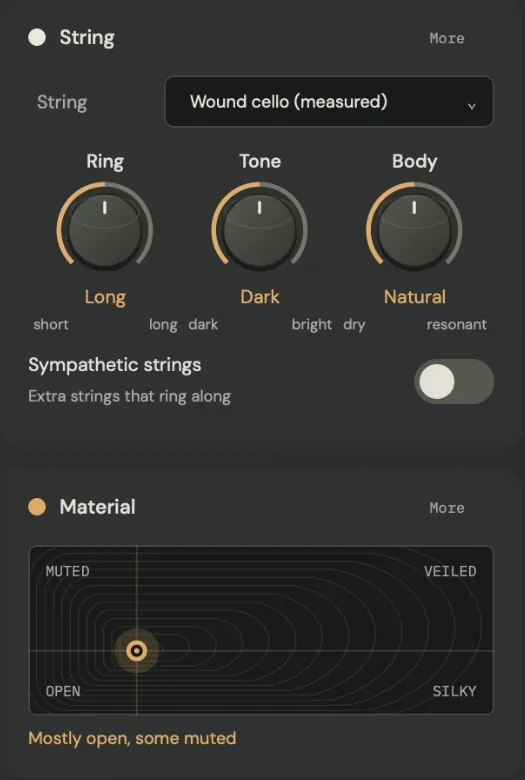
  7. The string’s material, then Ring, Tone and Body, and the Sympathetic strings switch for extra strings that ring along. More opens the rest of the part.

  8. The material pad: two named axes and four named corners for every program, here Fingers, Picked, Muted and Thump. The home corner is the preset as voiced, and the mod wheel moves the vertical axis.

  9. Five octaves with pitch and mod wheels, and the playing settings: Keys, Transpose, Voicing (Poly with its voice count, or Mono with glide), the Bend range and MPE, and how velocity plays the note.

  10. Modulation ↗ and Effects ↗ open their full-screen pages. The version sits beside PANIC, which silences every voice, tail and effect at once without changing the program.
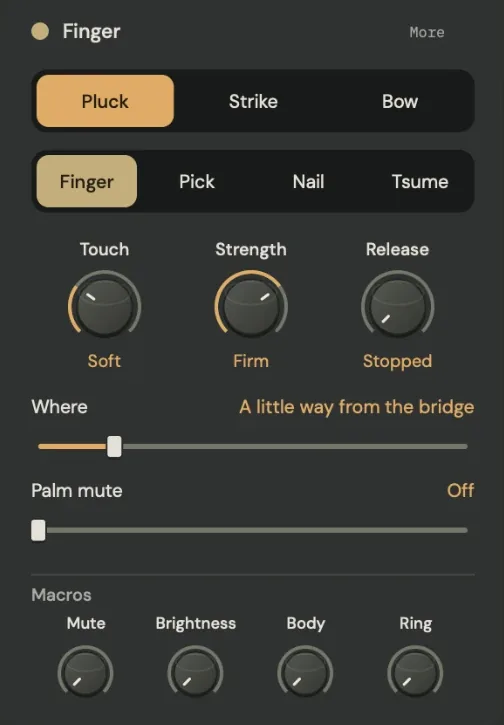
The Finger card on Acoustic Bass Guitar: Pluck, Strike and Bow; Finger, Pick, Nail and Tsume; Touch reading Soft, Strength reading Firm and Release reading Stopped; Where, a little way from the bridge; Palm mute, off; and the Macros row with Mute, Brightness, Body and Ring
How it is played, and the macros The playing card on Acoustic Bass Guitar. Release runs from stopped, a hand coming down on the strings when you lift the key, to let ring. The four macros sit at its foot.
The String and Material cards on Cellos · 6 players: the string set to Wound cello (measured), Ring reading Long, Tone reading Dark and Body reading Natural, the Sympathetic strings switch, and the material pad between Open, Silky, Muted and Veiled, reading Mostly open, some muted
The string and the material pad On Cellos, the pad blends between Open, Silky, Muted and Veiled, and says where you are in words.

Stage

The Stage

A bowed or plucked program can play as a section. Every section on every track sits on one stage, in one hall, heard from one seat, with a conductor shaping how the players play together.
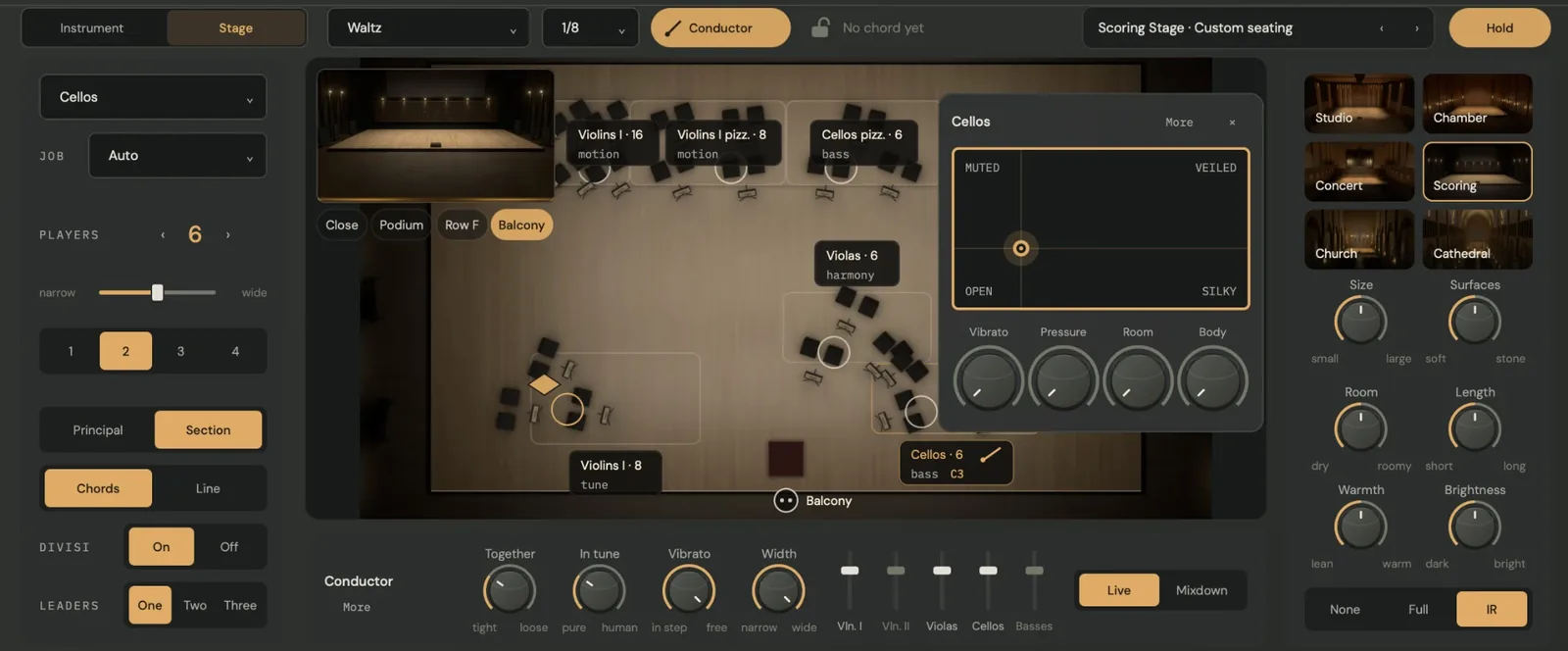
The Stage on Cellos · 6 players with the Waltz texture: on the left the section, its job, six players, spread, rows, Principal or Section, Chords or Line, Divisi and Leaders; in the middle the seating chart with Violins I, Violins I pizzicato, Cellos pizzicato, Violas and Cellos, the hall from the Balcony in the corner, and the Cellos card with its material pad and macros; below, the conductor's Together, In tune, Vibrato and Width with a fader per section and Live or Mixdown; on the right the six halls with Size, Surfaces, Room, Length, Warmth and Brightness
Sections
1 to 16 players, each with their own instrument, tuning and timing. Seven String Orchestra and five Guitar Ensemble programs arrive seated.
Seating chart
Every track in its own place, its desks lit as its players play, labelled with its size, its job and the notes it plays. Drag a section to reseat it.
Halls and seats
Studio, Chamber, Concert, Scoring, Church and Cathedral, heard from Close, the Podium, Row F or the Balcony, with Size, Surfaces, Room, Length, Warmth and Brightness.
Conductor
Together, In tune, Vibrato and Width, and a level fader per section. Live adds no latency; Mixdown lands the section on the beat with latency the host compensates.
Orchestrate
Play one line or chord and every section plays its own part: Chorale, Flowing, Pulse, Driving, Waltz, Tremolo, Answer, Counter-melody or Strum.
Playing
Principal or Section, Chords or Line, Divisi on or off, and one, two or three leaders playing in full detail.

Modulation

The Modulation page

Modulation opens full screen from the footer, on one page with no tabs. Every source is drawn as it moves, and every route is a cable you can see and pull.
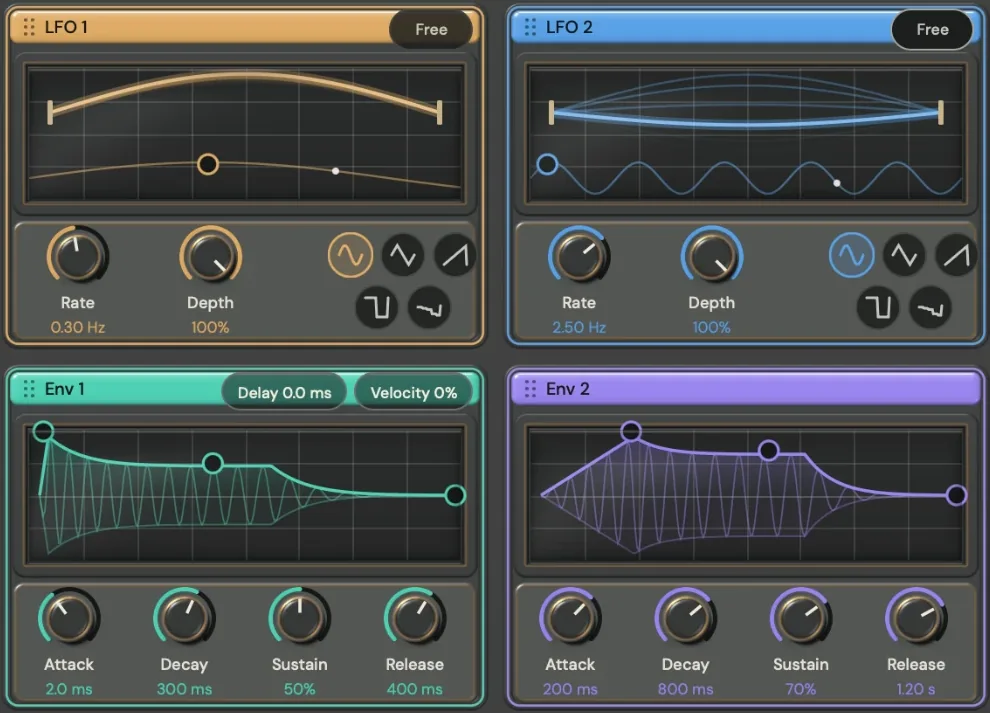
LFO 1 and LFO 2 with their live displays, Rate and Depth and five shape buttons, and Env 1 and Env 2 with their drawn contours, Attack, Decay, Sustain and Release; Env 1 also shows Delay and Velocity
Sources Two LFOs and two envelopes on live displays with draggable points. Drag a source’s coloured header into the patch to route it.
The Patch with one cable from Wheel to Material Y; the Macros, Mute, Brightness, Body and Ring, each naming what it moves, and Random; and Hands, with meters for Velocity, Pressure, Slide, Breath and Wheel, Keyboard, Breath and MPE, a touch curve, Learn and Bend ±2
Patch, Macros and Hands Each route is a cable from a source to a target; its thickness is the amount. The hands show what you play, live.
LFOs
Two, 0.01–20 Hz or synced to the host, with Sine, Triangle, Saw, Square and Random shapes.
Envelopes
Two, with Attack, Decay, Sustain and Release. Env 1 adds a Delay of up to 2 s and Velocity.
Patch
Up to 16 routes. Drag a cable to change its amount; click it to set its source, target, amount and curve.
Macros
The program’s four macros, each saying what it moves, and per-note Random.
Hands
Meters for velocity, pressure, slide, breath and the mod wheel, each with its settings; Keyboard, Breath or MPE; a touch curve; Learn; and the bend range.
Controllers
MPE, channel and poly pressure, breath, expression, foot and sustain, and two assignable controllers.

Effects

The effects rack

Eleven effect types follow the instrument on one chain. Drag a node on the rail to reorder it; the selected module opens on one large graph above its knobs, and the others run as live tiles.

The TEMPER Effects page on Acoustic Bass Guitar: Hold, Undo, Add, Aux and Mod, Load and Lat, and Bypass across the top; the rail from In through Phaser, Drive, Chorus, Ensemble and Convolve to Out, with Level and Guard; the Phaser open with its moving notches and Rate, Depth, Feedback and Mix; tiles for Drive, Chorus, Ensemble and Convolve
Chain
In, the modules in any order, Out. Up to 16 modules, with a second bank of EQ, Drive, Grains, Delay and Reverb.
Toolbar
Rack presets, Hold, Undo, Add, Aux and Mod, the rack’s Load and latency, and Bypass
Aux lane
A parallel lane between a send and a return, −60 to +6 dB
Output
Level −24 to +12 dB · Guard ceiling −12 to 0 dB, −1 dB by default
Modulation
16 rack routes: drag a source onto any knob
Rack presets
Warm Studio · Glass Motion · Velvet Ensemble · Body Cloud · Parallel Halo · Inharmonic Echo · Crushed Wood · Body Room · Diffuse Plate

EQ

Three-band equaliser

A low shelf, a mid band and a high shelf, with low and high cuts. Drag the bands on the curve, over the live spectrum. Smooth glides between settings without zipper noise; Legacy keeps the original response.

Low shelf
±18 dB, 30–500 Hz
Mid band
200 Hz – 8 kHz, Q 0.3–8
High shelf
1.5–18 kHz
Cuts
Low 10–1000 Hz · High 1–22 kHz
Latency
None
Controls
  • Low
  • Low Freq
  • Mid
  • Mid Freq
  • Mid Q
  • High
  • High Freq
  • Low Cut
  • High Cut
Modes
  • Smooth
  • Legacy

Drive

Distortion

Five characters, from soft saturation and a warm, biased drive to hard clipping, wavefolding and bit-crushing. Its graph shows the curve the signal is shaped by, with a live trail. Changing the character crossfades smoothly.

Bias
±0.5
Makeup
±12 dB
Latency
0, or 30 samples with Oversample on
Controls
  • Drive
  • Tone
  • Bias
  • Makeup
  • Mix
Mode
  • Soft
  • Warm
  • Hard
  • Fold
  • Crush
Oversample
  • Off
  • On

Grains

Grain delay

A granular delay that reads a window of up to 8 seconds of what it hears. Freeze holds the window; Play Mono follows the lowest held note and Poly plays up to eight held notes. Frozen audio can be kept with the session.

Window
0.25–8 s
Grain size
5–2000 ms
Density
0.5–100 per second
Pitch
±24 st
Controls
  • Position
  • Size
  • Density
  • Pitch
  • Scatter
  • Reverse
  • Pitch Jitter
  • Spread
  • Feedback
  • Window
  • Scan
  • Seed
  • Mix
Filter
  • Off
  • LP
  • HP
  • BP
Play
  • Off
  • Mono
Switches
  • Freeze
  • Poly
  • Sync

Delay

Stereo delay

Classic, stereo and ping-pong delay, drawn as taps on a timeline. The repeats have their own low cut, Wow adds slow, tape-like movement, and Duck lowers the repeats while you play.

Time
1–2000 ms, or 1/32–1/1
Feedback
Up to 0.95
Loop low cut
20–2000 Hz
Latency
None
Controls
  • Time
  • Sync
  • Division
  • Feedback
  • Damp
  • L/R Offset
  • Loop Low Cut
  • Wow
  • Duck
  • Mix
Modes
  • Classic
  • Stereo
  • Ping-pong

Reverb

Reverb

Plate, Hall and Room spaces with dense tails, a separate low-end decay and adjustable early reflections, drawn as the decay itself. A Classic space is also available.

Decay
0.1–20 s
Predelay
0–100 ms
Low decay
×0.5–2
Latency
None
Controls
  • Size
  • Decay
  • Damp
  • Predelay
  • Width
  • Diffusion
  • Modulation
  • Low Decay ×
  • Early
  • Mix
Modes
  • Classic
  • Plate
  • Hall
  • Room

Chorus

Multi-voice chorus

Two to four moving voices with feedback and a tone control. Changing the number of voices crossfades smoothly.

Voices
2–4
Rate
0.02–10 Hz
Delay
5–35 ms
Feedback
±0.7
Latency
None
Controls
  • Voices
  • Rate
  • Depth
  • Spread
  • Delay
  • Feedback
  • Tone
  • Mix

Ensemble

Detuned ensemble

Three to six detuned voices with slow, vibrato-like and random movement. The Widen modes fold away cleanly when the track is summed to mono.

Voices
3–6
Mono sum
Widening cancels
Latency
None
Controls
  • Voices
  • Detune
  • Width
  • Rate
  • Widen Amount
  • Tone
  • Mix
Widen
  • Off
  • Soft
  • Wide
  • Deep

Phaser

Phaser

Notches swept around a centre frequency, free or synced to the beat, with a stereo offset between the channels. Its graph shows the notches moving.

Stages
4 · 6 · 8 · 12
Centre
100 Hz – 8 kHz
Rate
0.02–10 Hz or synced
Stereo phase
0–180°
Feedback
±0.9
Controls
  • Rate
  • Depth
  • Center
  • Stereo Phase
  • Feedback
  • Sync
  • Mix
Stages
  • 4
  • 6
  • 8
  • 12

Comp

Compressor

A stereo-linked compressor with peak or RMS detection, a soft knee and parallel mix, drawn as its knee with a gain-reduction history. Key Low Cut keeps the low end from driving the gain.

Threshold
−60 – 0 dB
Ratio
1–20
Attack / release
0.1–100 ms / 10–1000 ms
Knee
0–24 dB
Latency
0, or 5 ms with Lookahead
Controls
  • Threshold
  • Ratio
  • Attack
  • Release
  • Knee
  • Makeup
  • Key Low Cut
  • Mix
Detector
  • Peak
  • RMS
Lookahead
  • Off
  • 5 ms

Shift

Frequency shifter

Shifts the upper, lower or both sidebands. Track sets the shift as a ratio of the lowest held note, so it follows what you play.

Shift
±2000 Hz
Feedback
±0.9
Track ratio
0.01–4 × lowest note
Controls
  • Frequency
  • Feedback
  • Feedback Tone
  • Stereo
  • Ratio
  • Mix
Sideband
  • Up
  • Down
  • Both
Track
  • Off
  • On

Convolve

Convolution reverb

Places the instrument in another space, with no added latency. The impulse can be the program’s own body, another factory instrument, a room, plate or hall, or your own WAV or AIFF file.

Predelay
0–200 ms
Your own file
Up to 8 MiB, saved with the session
Latency
None
Controls
  • Predelay
  • Length
  • Low Cut
  • High Cut
  • Width
  • Gain
  • Reverse
  • Mix
Impulse
  • Body
  • Instrument
  • Room
  • Plate
  • Hall
  • File

Factory library

115 programs in 14 families

Every program shows its own instrument and names its four macros and its material pad’s axes and corners. In the Audio Unit and standalone versions the programs also appear in your host’s program menu.

Acoustic Guitars

7

Classical, Flamenco, Baroque, Steel-String, Baritone, Archtop and Gypsy Jazz guitars.

Electric Guitars and Basses

8

Clean Single-Coil, Jazz Box, Acoustic Bass Guitar, Fretless, Finger, Pick, Flatwound Thumb and Five-String basses.

Lutes and World Plucked

11

Mandolin, Bouzouki, Charango, Renaissance Lute, Oud, Cavaquinho, two ukuleles, Banjo, Balalaika and Bağlama.

Harps and Zithers

8

Concert Harp, Celtic Harp, Lyre, Koto, Guzheng, Gayageum, Concert Zither and Autoharp.

Keyboard Strings

5

Grand Piano, Honky-Tonk Upright, Harpsichord, Clavichord and Hammered Dulcimer.

Bowed Strings

11

Violin, Viola, Cello and Double Bass, sul tasto, sul ponticello and col legno, pizzicato, and Bowed Psaltery.

Bowed and Rubbed Objects

4

Bowed Cymbal, Bowed Tam-tam, Bowed Steel Plate and Bowed Aluminium Disc.

Mallets and Tuned Metal

10

Marimba, Vibraphone, Glockenspiel, Celesta, Glass Marimba, Tubular Bells, three gamelan instruments and Balafon.

Materials

4

Head Materials, Glass Sheet, Glass Rods and Brass Tubes.

Drums and Hand Percussion

20

Kick, Snare and toms, Cajón, Frame Drum, Bodhrán, Djembe, Conga, Bongos, Taiko, Talking Drum, Claves, Woodblock and Cowbell.

Gongs, Cymbals and Bells

9

Tam-tam, Opera and Wind Gongs, Crash and Ride Cymbals, Church and Temple Bells, Handbells and Singing Bowl.

Experimental

6

Ten-Metre Monochord, Harmonic Drone, Aeolian Harp, Rising Gong, Bell Cloud and Rain on Tin.

String Orchestra

7

Violins I and II, Violas, Cellos and Basses, with pizzicato Violins I and Cellos: sections of four to eight players.

Guitar Ensemble

5

Classical and Steel-String Guitars I and II, four players each, and Bass Guitars, two players.
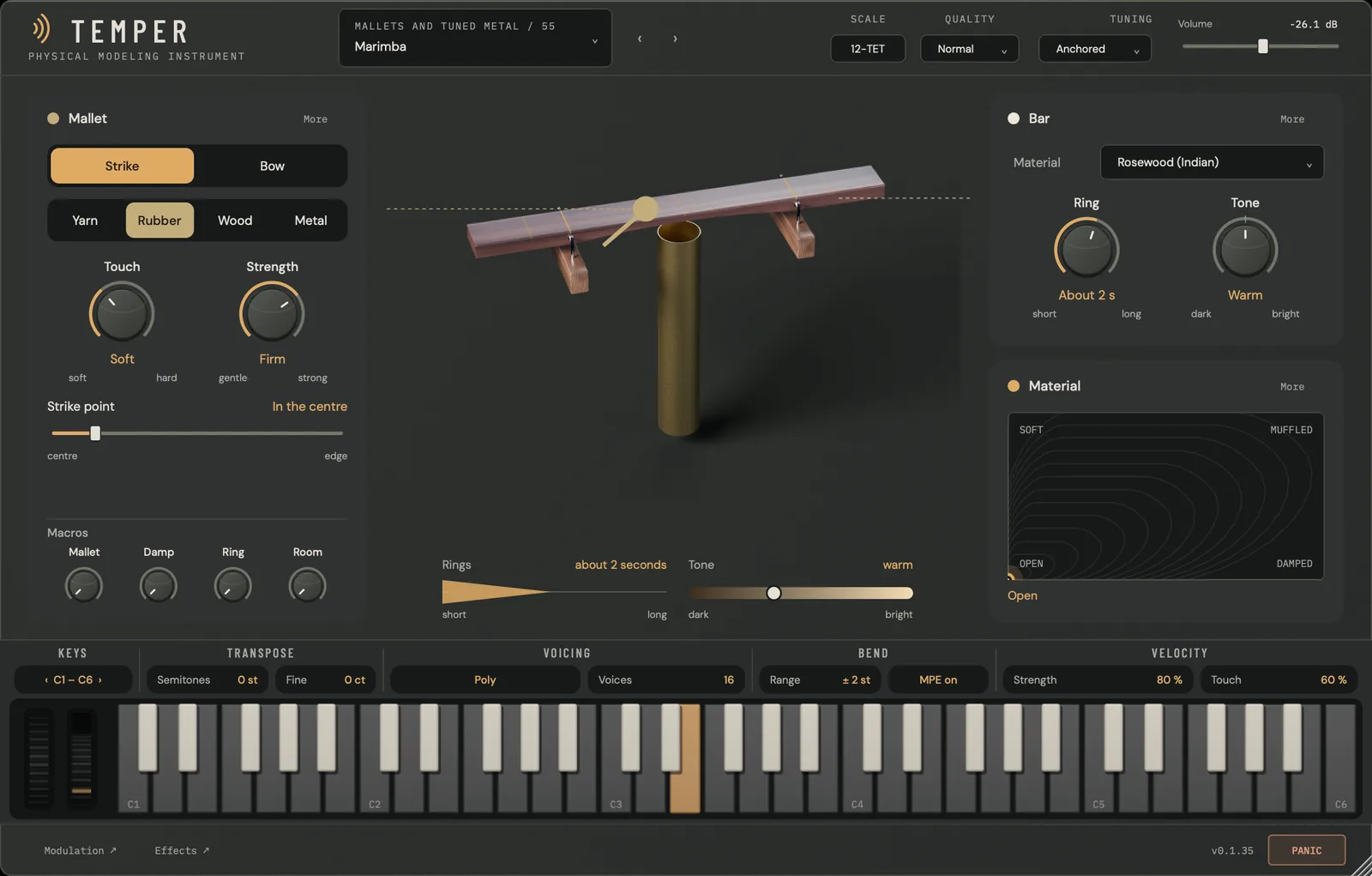
TEMPER playing Marimba: the Mallet card with Strike or Bow, Yarn, Rubber, Wood or Metal, Touch, Strength and Strike point, and the Macros Mallet, Damp, Ring and Room; the marimba bar over its resonator tube with the mallet; the Bar card in Rosewood and the material pad between Open, Damped, Soft and Muffled
Mallets and Tuned Metal / 55, Marimba A struck bar: the card is named Mallet, and the right-hand card Bar.
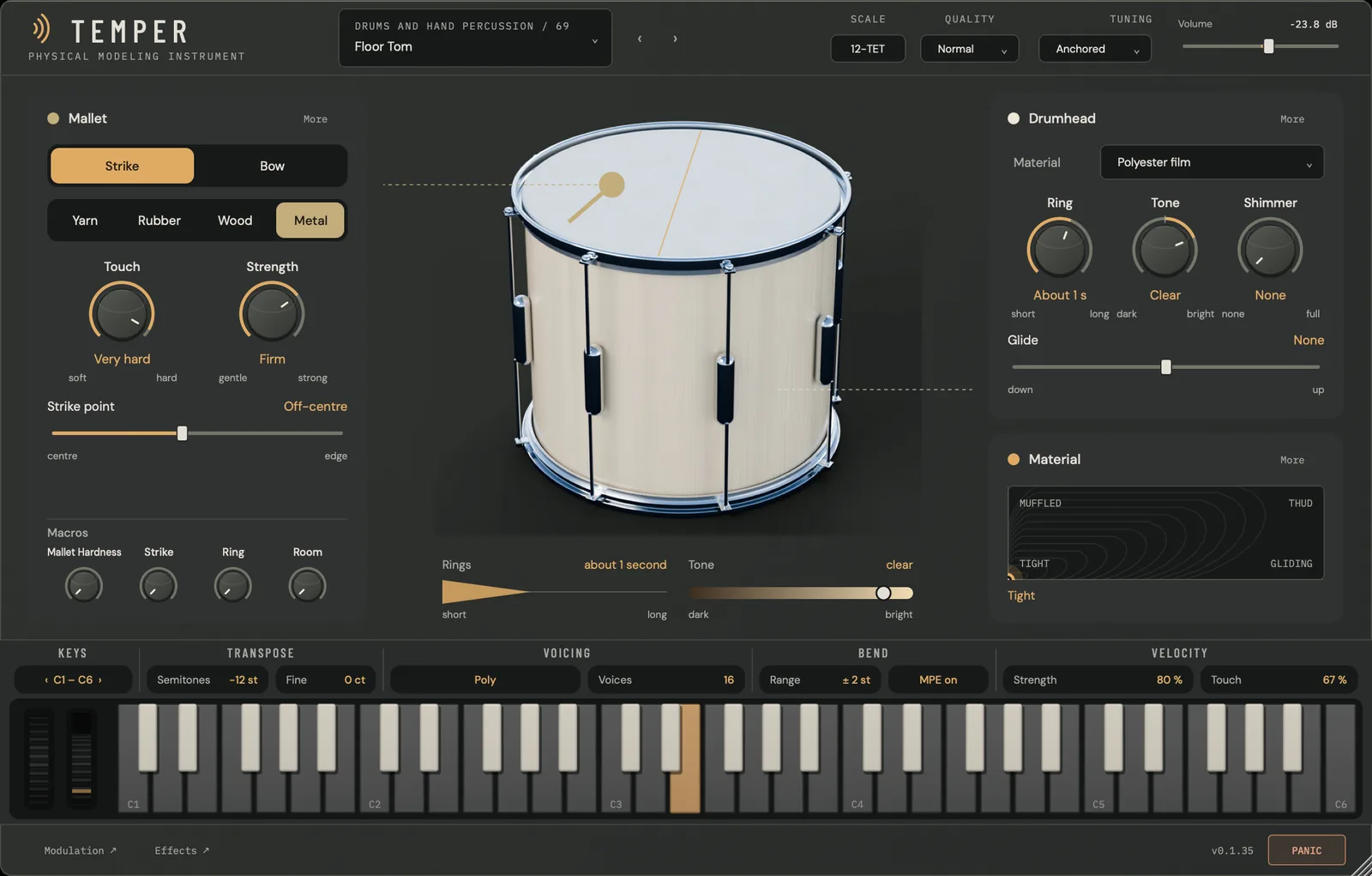
TEMPER playing Floor Tom: the Mallet card with a Metal head struck off-centre, the drum with its strike point, the Drumhead card in Polyester film with Ring, Tone, Shimmer and Glide, and the material pad between Tight, Gliding, Muffled and Thud
Drums and Hand Percussion / 69, Floor Tom A drumhead, with Shimmer and Glide, and a pad from Tight to Thud.

Updates

Changes by version

The changes in recent TEMPER builds, newest first. A build marked “In development” is not yet the download.

  1. 0.1.35 In development
    • The factory library is 115 programs in fourteen families, including seven String Orchestra and five Guitar Ensemble sections. Program numbers change with the new library.
    • Every program shows a photoreal picture of its own instrument.
    • Every program has a material pad with two named axes and four named corners, and the mod wheel moves its vertical axis.
    • Each program’s four macros sit on the front panel, under the playing controls.
    • The Stage seats sections of up to 16 players in one of six halls, with a conductor; Orchestrate turns one played line or chord into a part for every section.
    • Modulation opens full screen: two LFOs and two envelopes drawn live, the patch as cables, the macros, and the hands.
    • The Effects page has a reorderable chain rail, one large graph for the selected module, and live tiles for the rest.
    • Plucked and bowed strings have a Release control, from stopped to let ring.
  2. 0.1.0 Current download
    • Each program shows a picture of its instrument, built from the engine’s own measurements, with the pluck, strike or bow point drawn on it.
    • The effects rack is colour-coded by module, with A/B banks for EQ, Drive, Delay, Reverb and Granular.
    • 92 programs in eight families and nine effects-rack presets.

Specifications

TEMPER 0.1.35

macOS
TEMPER: Audio Unit, VST3, standalone app · TEMPER FX: Audio Unit, VST3 · macOS 11 or later, Apple Silicon or Intel (universal)
Current download
TEMPER 0.1.0 · 0.1.35, described on this page, is in development
Type
Instrument, and an effect version (TEMPER FX) · MIDI and MPE
Factory library
115 programs in 14 families · 9 effects-rack presets
Polyphony
Up to 64 voices, set per program
Sections
1 to 16 players per track · six halls · four seats
Modulation
16 routes · 2 LFOs · 2 envelopes · 4 macros · per-note random
Tuning
Scala scales and keyboard maps · MTS-ESP in the plug-ins · A4 400–480 Hz
Sample rates
44.1–192 kHz
Interface
1160 × 740 · resizable from 900 × 600 to 2200 × 1400
Availability In development · join the waitlist
Notify me →

Waitlist

TEMPER waitlist

Get release news about TEMPER by email.

Join for product news and private-beta interest. Selected testers receive a separate invitation.

We use your email only for product updates. See our privacy policy.