MOSAIC glossary of functions
Every control in the window, grouped by where it lives, then every parameter of every lane, then the words the manual uses. The descriptions are the plug-in’s own: turn on help mode (? in the header) and the same sentences appear when the pointer rests on a control. An A to Z index is at the end.
Conventions: a range is given where it is fixed (milliseconds, semitones, hertz); an unmarked control runs from 0 to 1. “No knob on the row” means the parameter is reached from the STEP VALUE band, the mod deck, the matrix or host automation rather than from the knob row.
Header

Preset key. The arrows step through every factory and library preset, one at a time. Click the name to open the preset browser.
Preset browser. A catalogue that opens over the window when you click the preset name. Click a name to load it and keep browsing; Esc, the close button or a click outside the card closes it. A dot marks the loaded preset and the active pattern.
- Header pills. NEW empties the bank and starts from nothing. IMPORT loads a
.mosaicfile from anywhere. EXPORT writes the bank to a new.mosaicfile wherever you choose. - Types. The column on the left, each type with its count: All (every preset, without the patterns), Patterns (the twelve patterns of the current bank; click one to switch to it), Factory (the eight banks built into the plug-in), then one type per folder of the preset library (Ambient, Granular, Loops, Motion, Rhythmic, Spectral, Swirl, and User once you have saved a preset of your own).
- Search. The field above the list filters the chosen type by name or type, in any case. Up and Down move through the list and audition each preset; Return loads the highlighted one.
- The list. One row per preset, its type as a tag on the right. Scroll with the wheel or by dragging.
- Save bar. A name field (it offers the loaded preset’s name), SHOW FOLDER and SAVE PRESET. SAVE PRESET, or Return in the name field, writes the bank into the User folder of the preset library and shows it under the User type at once. A named save may update the preset you loaded from that folder, but it never replaces a different preset: if the name is taken, the line above the bar says so and asks for another name. SHOW FOLDER opens the User folder on your computer.
Undo / redo. The two arrows, or Cmd+Z and Cmd+Shift+Z (Ctrl on Windows). One step per gesture.
SIZE key. The percentage next to redo. It scales the whole window to 70%, 80%, 90%, 100%, 115%, 130%, 150% or 180%, or Fit to screen. New instances open at the size you last picked.
Skin selector. Three swatches and the skin’s name: Carbon, Mineral or Oxblood. The choice applies to every open MOSAIC.
Scope pane. A small display in the header, between the SIZE key and the skin selector, that changes with the selected lane. SAT: the live saturation curve (drive, shape, asymmetry). SIEVE: the spectrum, which you can drag to sweep the spectral cursor (POS). SPOOL: the reel, spinning at the live tape speed and flagging the live fault; drag it vertically to set DRAG. SEIZE: a thumbnail of the cycle curve with its playhead; click it to open the BENCH. With any other lane selected, as in the figure above (LOOP), the space is empty.
Output meter. Left and right output level, with the plug-in’s CPU load.
Help mode (?). Show a description when the pointer rests on a control. Off when a window opens; on and off per window. Screen readers get the descriptions whether help mode is on or not.
Activation card. Shown over the interface until the computer is activated, and again if the authorization lapses. ACTIVATE starts the browser step and shows the code to confirm; OPEN BROWSER AGAIN re-opens the activation page; ENTER CODE accepts the fallback code the activation page hands out; YOUR PRODUCTS opens your account page. While the card is up, audio passes through unprocessed.
Knob row and master section

Effect knobs. The selected lane’s controls, up to five, each on its own plinth. Three lanes put a switch in the first cell instead of a knob (MOD’s MODE, SAT’s SHAPE, PRISM’s MODE); LOOP replaces three cells with its PITCH MODE and MODE switches and a live loop view; SEIZE gives three cells to its lane rail. The knob’s inner arc is the base value in the lane’s colour; the outer green ring is the range modulation sweeps.
Modulator pane. Hover a modulated knob and a pane lists every source on it with its range. Drag a source there for depth, double-click it to zero it, or press CLEAR to remove them all.
MIX (per lane). How much of the lane’s output replaces the lane’s input. 0 is an exact bypass. Every lane has one, on the plate to the right of its knobs.
DRY/WET. The global mix: how much of the processed sound replaces the input. 100% is fully processed.
DRIVE (master). Saturation on the whole output, after DRY/WET. Adds harmonics and glues the mix; at 0 the stage is bypassed exactly.
FAT. Weights DRIVE toward the low end: bass saturates earlier and thickens, with no net tone change of its own. Needs DRIVE above 0.
Tail. How long the plug-in breathes out after the track stops: eight seconds, fixed. The host parameter “Tail (legacy)” is kept for old automation lanes and does nothing.
Sequencer rail
Lane keys. Twelve keys on the rail under the effect panel, one per lane, in the roster order GRAIN, SIEVE, SPEC, MOD, SAT, LOOP, PRISM, WARP, STRTCH, WEAVE, SEIZE, SPOOL. The selected key widens to show the lane’s number, name and role, and a metal bridge routes it up into the effect panel; the others carry their name and a light in the lane’s colour. Click one to select the lane; the knob row, the STEP VALUE band, the deck and the scope pane follow.
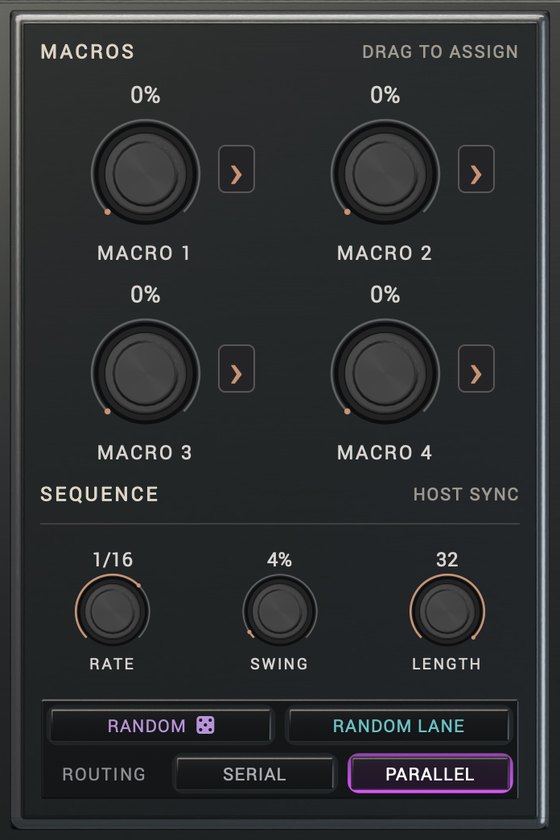
Macros M1 to M4. Four dials you can automate from your DAW. Drag a dial’s > tab onto any effect knob to route the macro to it through the matrix (the drop commits the route; drag the knob’s ring or the route card’s bar for depth; multiple targets are fine). Drop a deck LFO, ENV or STEP pad onto a macro dial to modulate the macro itself. Each pattern keeps its own macro positions. Macros 5 to 8 exist only as host parameters (“legacy”) so older sessions keep playing; they have no dial.
RATE. How fast the sequencer steps: 1/4, 1/8, 1/16 or 1/32 note per step.
SWING. Delays every other step for a shuffle or groove feel.
LENGTH. How many steps the pattern loops over: 2, 4, 8, 16 or 32. The green bracket on the grid shows the loop.
Guided tour. The TOUR tab on the window’s right edge opens a shade that walks the window region by region: pick a stop and the rest of the window dims while that region is outlined, with what it does and one thing to try. NEXT / BACK step through; the window stays playable. View state only: never saved in a preset or session.
RANDOM (the key with the die). Generate a scene: picks a musical plan, casts a few effects, writes coordinated patterns for them, and rebuilds the global modulation matrix — a fresh pool of sources and routes aimed only at the lanes the roll cast. Locked lanes, and the routes pointing into them, are left alone. One undo step.
RANDOM LANE. Re-roll the selected effect only: its knobs, its pattern, its deck slots and their fan-out routes, its per-step values, and its own matrix routes. Every other lane’s routes and the shared source pool are left alone; a locked lane refuses the roll outright. One undo step.
ROUTING: SERIAL / PARALLEL. Two keys under the ROUTING label; the lit one is the routing. SERIAL chains the effects one after another in a fixed order; PARALLEL runs them side by side and sums their outputs.
The grid
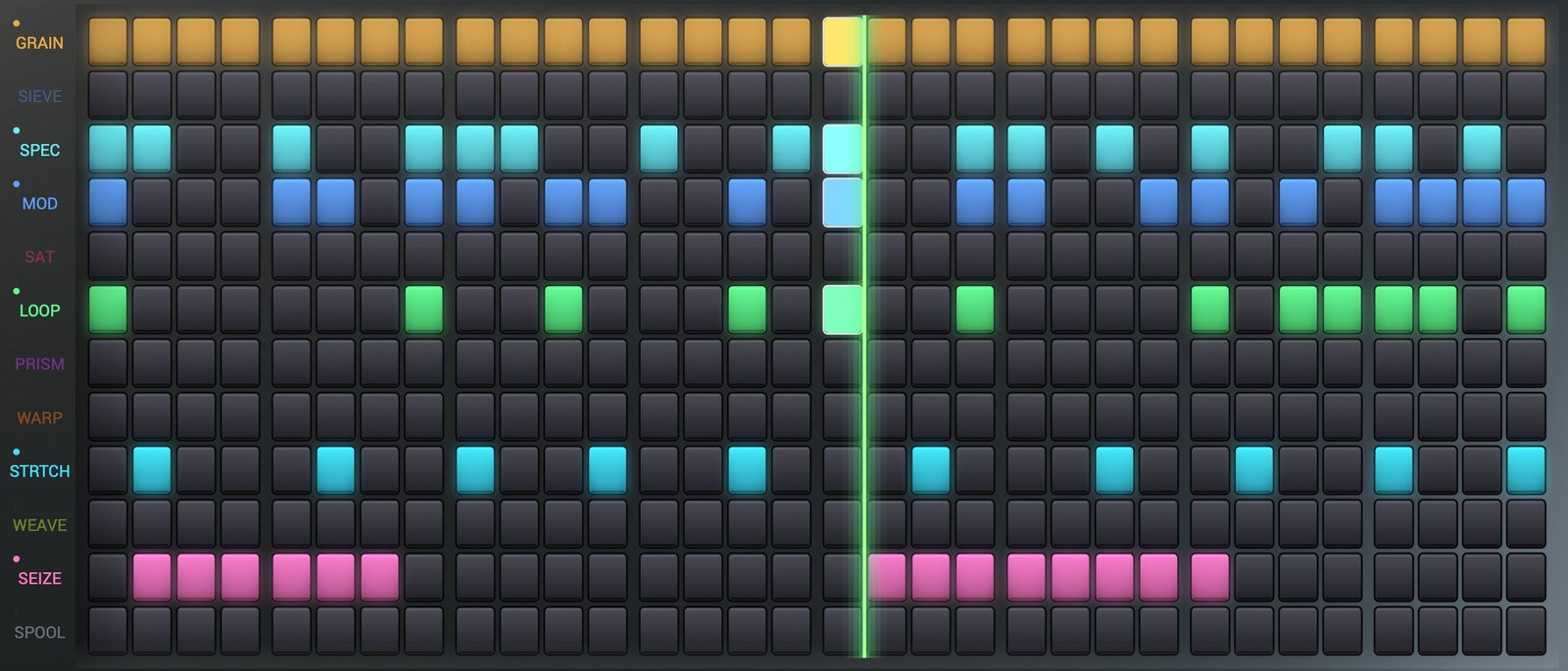
Grid. Each row is one effect, each column one step. Click a cell to turn it on or off; drag to paint. Painting on a muted lane wakes it.
Selection. Shift+drag lassos a region. Drag inside the selection to move it; hold Alt while dragging to copy it. Esc clears the selection; Delete clears its steps; Cmd+D (Ctrl+D on Windows) duplicates it to the right.
Lane switch. The lane’s name at the left of its row. Click to mute or unmute the lane. Ctrl-click or Shift-click to cycle a per-lane loop length (2, 4, 8, 16, 32, or back to following LENGTH); the number appears under the name. Right-click to lock the lane so the randomizer skips it.
Playhead. The bright column that follows the host transport. The standalone app runs its own clock at 120 BPM.
Loop bracket. The green corners marking the LENGTH loop on the grid.
STEP VALUE band

STEP VALUE. Draw a per-step value for one parameter of the selected effect. Pick the parameter with the chips at the left (up to six per lane, including parameters that have no knob on the row). A step without a bar uses the knob. Right-click a bar to clear it. The values live in the pattern.
Mod deck
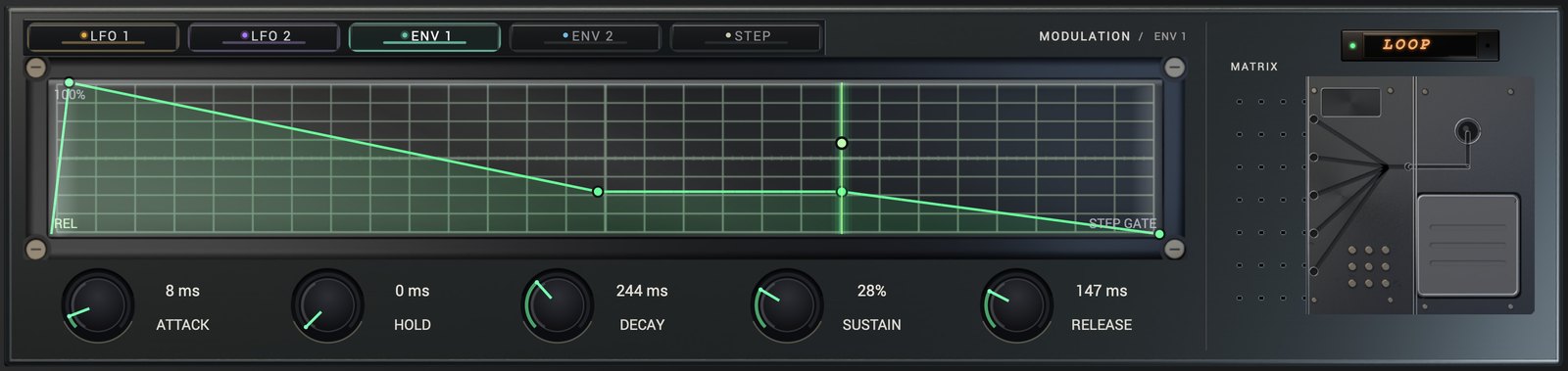
Slots. Five per lane, along the top of the deck: LFO 1, LFO 2, ENV 1, ENV 2, STEP. Click a slot to edit it (clicking also switches it on); right-click it to turn it off; drag it onto a knob to make that knob its target. Editing a slot’s own fields (its shape, rate, envelope or depth) switches the slot on.
Shape editor. The deck’s display, the plot of the selected slot. For an LFO it is a node curve over one cycle; for STEP, sixteen bars; for an envelope, the AHDSR contour. All three are edited directly on the plot: see Draw mode.
RATE (LFO). How fast the lane’s LFO cycles. Click the SYNC / HZ chip to switch: SYNC sweeps tempo-locked divisions from 32 bars to 1/64; HZ sweeps free rates from 0.05 to 20 Hz. Drag up or down, or scroll.
1 CYCLE / 1 LOOP. The key beside SYNC says what the plot spans: one cycle of the LFO, or one loop for STEP. It is a label, not a button.
SHAPES. The LFO shape bank, 40 shapes from a plain sine to gates, ratchets and Euclidean figures. The six keys load Soft Sine, Ramp Up, Saw Down, Square, Triangle and Stairs into the slot; the chevron at the end of the row opens the SHAPES menu, which lists all 40 by name. A shape is copied into the slot, so you can edit it freely afterwards.
Envelope (ENV 1, ENV 2). A standard AHDSR triggered by the lane’s steps: ATTACK rise, HOLD at the peak, DECAY down to the SUSTAIN level, held while steps stay on, RELEASE when they stop. Drag the five knobs, or drag the contour itself (see Draw mode). The plot reads “no modulation” while the slot is off.
STEP. A 16-value sequence, one value per step. CLOCK GRID steps it with the sequencer; CLOCK RATE runs it on its own tempo-locked clock, whose RATE dial sets how long one pass takes. LEN plays only the first N of the 16 steps. The PATTERN menu (the chevron at the end of the row) writes ramps, triangles, combs, gates and Euclidean distributions into the 16 steps.
Depth. How far a slot moves its target. Set it by dragging the target knob’s ring, or the bar on the card that appears after a drop. Esc or a right-click on the card undoes the drop.
Nameplate. The LED readout showing the selected lane’s name, or MATRIX while the matrix is open.
MATRIX pedal. The footswitch at the bottom right. Press it to open the global modulation matrix inside the window, over the sequencer and the deck; press it again to return to the lane’s slots. The Return to matrix button above the deck opens it too.
Draw mode
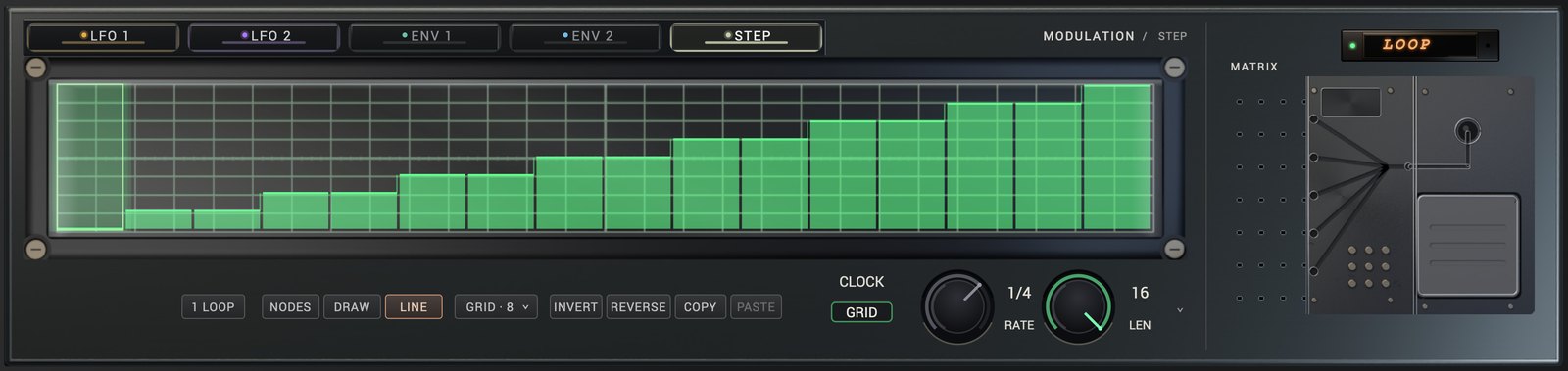
LFO 1, LFO 2 and STEP share one tool strip under the plot. ENV 1 and ENV 2 hide it: their plot is the editor.
NODES. The node editor. Drag a node to move it, drag a segment to bend it, double-click to add or remove a node, right-click a segment to change its shape. On STEP, paint the bars.
DRAW. Paint the shape freehand; the stroke becomes editable nodes (at most 32). On STEP it paints the steps.
LINE. Drag a straight run from the press to the release; it replaces what lay between. On STEP it draws a ramp across the steps.
GRID. A menu that snaps drawn points and nodes. TIME divides the plot into 1/4, 1/8, 1/16 or 1/32 of its span; VALUE snaps to 4, 8 or 16 levels; either can be Off. The key shows the grid in use: GRID OFF, GRID 1/16, GRID · 8 or 1/16 · 8. With a TIME grid, a DRAW stroke becomes one held value per division.
INVERT. Flip the shape upside down.
REVERSE. Play the shape backwards.
COPY. Copy this shape (LFO, STEP or drawn) to paste into another modulator.
PASTE. Replace this shape with the copied one; a STEP row becomes held steps on an LFO, a curve becomes 16 steps. The clipboard holds one shape and keeps it while you change slots or lanes; PASTE is greyed out until something has been copied.
Invert, reverse and paste are one undo step each; copy changes nothing.
Envelope plot (ENV 1, ENV 2). The contour’s five corners are handles. Drag the attack peak sideways to set ATTACK; Option-drag it (Alt on Windows) to set HOLD; drag the end of the hold to set HOLD; drag the end of the decay to set DECAY and SUSTAIN together; drag the end of the sustain shelf up or down to set SUSTAIN; drag the last corner sideways to set RELEASE. Each handle stays inside its knob’s range. Drag anywhere else on the plot to bend the whole envelope (up eases out, down eases in); double-click open plot to straighten it.
Matrix
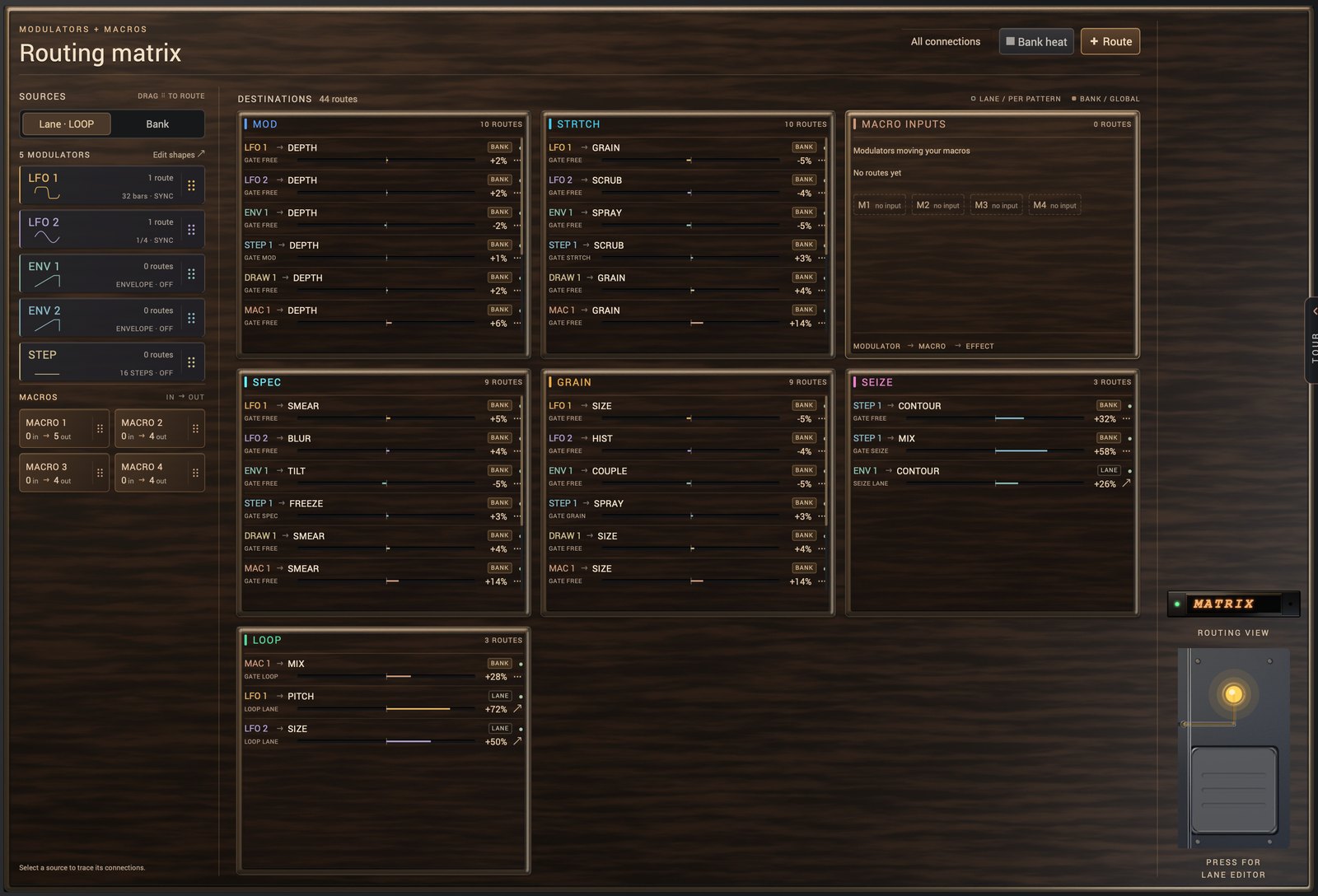
Matrix. The global modulation matrix, one per bank. Build a pool of sources and route each to any parameter of any effect, with its own depth. Up to 16 sources and 64 routes. It opens on the routing map (MAP); two more views show the bank’s sources and routes as lists (BANK) and the routing as a heat grid (HEAT).
Routing map. The matrix’s first view, titled “Routing matrix”.
- SOURCES, on the left, with two tabs. Lane · name shows the selected lane’s five deck modulators, each with its route count; Edit shapes opens that lane in the deck. Bank shows the bank’s own sources; an empty tile reads + Source and adds one; Edit bank opens the bank editor. Drag a source onto a knob to route it there (DRAG TO ROUTE); right-click a lane modulator to turn it off.
- MACROS. The four macros as tiles, each counting what moves it and what it moves (IN → OUT). Drag a tile onto a knob to route that macro.
- DESTINATIONS, on the right: one card per destination lane, each route a row (source → parameter, its gate, a depth bar and the signed amount). A badge says whose route it is: LANE (a deck slot’s, kept per pattern) or BANK (the matrix’s own, shared by every pattern). The MACRO INPUTS card lists the modulators that move your macros; a macro with no input shows a tile you can drop a lane modulator onto.
- Click a source or macro to trace its connections: the other routes dim, and the All connections button at the top reads ”× name connections” until you click it to show everything again.
- Bank heat opens the heat grid. + Route adds a bank route (and an LFO source, if the bank has none) and asks for its destination.
On a BANK row: drag the depth bar for the amount, double-click it to zero it, click the gate for its gate, the source for another source, the parameter for another destination; the lamp turns the route on and off, the ··· key offers Disable route, Reset amount to zero and Delete route, and a right-click deletes it. Clicking a LANE row opens that lane in the deck, where it is edited.
Bank editor (BANK). Opened by Edit bank on the routing map: the sources and routes as two lists, BANK SOURCES and BANK ROUTES, each with a +.
- Sources. Each source has a name chip (click it for its kind, drag it onto a knob to route it), a rate chip, a polarity badge and
×. Kinds: LFO (synced or free), ENV (an envelope follower on the input), A / R (an attack/release envelope re-triggered each cycle), RAMP (a ramp across the loop phase), STEP (a 16-step sequence, its pattern picked from the step bank), MACRO (one of the four macro dials). A bank may also hold DRAW sources, a drawn curve across the loop; the+menu does not create them. The badge reads+for a source that moves only upward from the knob and±for a bipolar one, which swings both ways around it.×removes the source. - Routes. Each route is a source, an arrow, a destination named lane·parameter, a gate chip, a depth bar with a signed percentage, an enable LED and
×.
Gate. A route’s gate: FREE means the route acts continuously; a lane name means it acts only while that lane’s step is on. The gate menu offers Free (continuous) or Gate by any lane.
HEAT. A read-only grid of sources (rows) against lanes (columns). Each cell is the summed depth of that source’s enabled routes into that lane, as a percentage, tinted in the lane’s colour.
MAP / HEAT (view key). In the bank editor and the heat grid, a key names the next view: HEAT from the bank editor, MAP from the heat grid, back to the routing map.
SEIZE BENCH
BENCH. The full-width curve editor for the SEIZE lane, opened from the thumbnail in the header. It has a 32-column snap and every chip of the lane rail. Option-click a node to place a GRAB marker: the interval between markers is the audible repeat period. Esc closes it.
The lanes
Each lane’s parameters, in the order they appear on the knob row, then the knobless ones. The lane word in the heading is the lane key’s label.
GRAIN
Granular cloud: slices the input into tiny grains and rebuilds it as texture. Coupled to SIEVE.
- COUPLE. How strongly GRAIN listens to SIEVE’s spectral energy. 0 is independent; up, the cloud breathes with the gate.
- SIZE (5 to 200 ms). Grain length. Short is fizzy, granular texture; long is smeared, washy clouds.
- DENS (1 to 8). How many grains overlap at once. Low is sparse specks; high is a continuous cloud.
- PITCH (±24 st). Transposes the grains in whole semitones. Try +12 or −12 for octave shimmer.
- SPRAY. Randomizes where grains are picked from. 0 is a tight echo of the input; up is scattered and diffuse, at every PITCH.
- MIX. How much of GRAIN’s output replaces the lane’s input. 0 is an exact bypass.
- HIST. How far back into the recent input grains are picked from: 0 reads just behind the input; up, the cloud lags the source instead of shadowing it. No knob on the row.
- SIZE MIN, FLUX DRIVE, PITCH TRACK. Expert controls for the GRAIN/SIEVE coupling. Host automation only.
SIEVE
Spectral gate: carves the sound in the frequency domain, letting only chosen energy through. Coupled to GRAIN.
- COUPLE. How strongly SIEVE reacts to GRAIN’s activity.
- THRESH. How far a partial must stand above its own neighbourhood to pass the gate, by the same rule from the lows to the highs. Low settings let the noise between partials through; from the default up, a steady noise floor stays shut. Higher, only the most prominent partials survive. This is the control that decides how much gets through.
- OPEN. The width of the band that gets pried open: by GRAIN’s transients while COUPLE is up, and by the POS cursor while POS is off zero. It is not a master gate; on a standalone SIEVE with POS at 0 there is no band to widen.
- SMEAR. Blurs the gate’s reaction over time, softening the on/off pumping into a wash. It also sets how long RING’s held partials take to decay (up to about half a second).
- TILT. Tilts the residue that survived the gate, up to ±6 dB darker (left) or brighter (right).
- MIX. How much of SIEVE’s output replaces the lane’s input. 0 is an exact bypass.
- RING. Sustains selected partials: a steady note is not boosted and a dying one rings on. SMEAR sets the tail. No knob on the row.
- BINCRV. Leans the gate along frequency: left favours the lows, right the air. The centre is neutral. No knob on the row.
- POS. A movable spectral cursor: opens the gate in a band centred here (width OPEN). Sweep it to scan which partials survive. 0 is off. Drag the header pane to move it.
- RESOLVE. How the gate decides: 0 is a hard in/out at THRESH, 1 a soft expansion across a knee. Host automation only.
SPEC
Spectral freeze: captures and holds the sound’s spectrum as a sustained, smearable pad.
- FREEZE. Holds the current spectrum like a pad, every partial at its own true pitch. 0 is pass-through; 1 a full freeze of whatever is playing.
- SMEAR. Two jobs on one axis. Turned down it adds inertia to the hold; turned up it is the bleed rate, how fast new sound louder than the frozen frame is taken in (from several seconds at low settings to a fraction of a second at 1.0). It works at full freeze.
- TILT. Darkens (left) or brightens (right) the frozen spectrum, hinged at 12 kHz.
- BLUR. Diffuses energy across neighbouring frequencies and detunes the held partials slightly, so a freeze shimmers and slowly beats like an ensemble.
- HIT. What FREEZE holds. HOLD (the default) holds whatever is playing. HIT holds the hit that opens each step: the hold follows the attack live, captures it once the attack has peaked, and keeps it until the next step captures its own. The tail of an earlier sound is skipped, so a slightly late or early hit still counts. A two-key switch in the fifth cell.
- MIX. How much of SPEC’s output replaces the lane’s input. 0 is an exact bypass.
MOD
Modulation: chorus, flanger and phaser movement, from subtle width to full warble.
- MODE. Picks the engine: Chorus (ensemble), Flanger (jet comb), Phaser (all-pass sweep). A change, even per step, crossfades smoothly between them. A switch in the first cell.
- RATE (0.01 to 10 Hz). Modulation speed. Slow is gentle drift; fast is vibrato or warble.
- DEPTH. How far the modulation swings. At 0 the movement stops, but the lane is still a static full-wet comb or notch network and still colours the sound; MIX is what bypasses it.
- MIX. How much of MOD’s output replaces the lane’s input. 0 is an exact bypass.
SAT
Multipolar saturator: four distortion curves with asymmetry and tone, from tape warmth to wavefolding.
- SHAPE. The saturation curve: Tanh (tape-soft), Hard (clip), Cubic (smooth), Fold (wavefolder chaos). A switch in the first cell.
- DRIVE. How hard the signal hits the curve. More is warmer, then crunchier.
- ASYM. Pushes the curve off-centre, adding even harmonics (tube-style character).
- TONE. Tilts the signal before the shaper, so it decides what saturates: left pushes the lows into the curve, right the highs. Pre-emphasis into the distortion, not an EQ on the result.
- OUTPUT (0 to 2). Your manual trim after the shaper. SAT already holds its level; this is your own balance on top.
- MIX. How much of SAT’s output replaces the lane’s input. 0 is an exact bypass.
LOOP
Tempo-synced looper: captures beats or bars and replays them forward, reversed, or endlessly re-captured.
- SIZE. How much audio the looper captures and repeats: 1/16 BEAT, 1/8 BEAT, 3/4 BEAT, 1 BEAT, 2 BEATS, 3 BEATS, 1 BAR, 2 BARS or 4 BARS.
- PITCH (±24 st). Replays the captured loop shifted in whole semitones. The dry input is untouched.
- PITCH MODE. REPITCH is tape varispeed: PITCH changes the loop’s speed with it. WARP keeps the loop’s original speed and shifts pitch only. A switch on the row.
- MODE. FORWARD replays the capture as recorded, REVERSE plays it backwards, ENDLESS keeps re-capturing live. A switch on the row.
- TRIG. What starts a capture in FORWARD and REVERSE (ENDLESS has none). PHRASE (the default) captures at the top of each pass of the pattern. STEP captures when one of the lane’s steps opens: the step’s first SIZE plays live, then repeats. BACK loops the SIZE that played just before the step opened, from the moment it opens. Three keys along the top of the loop view.
- Loop view. The playhead shows where the looper is reading in its captured audio. The TRIG keys sit along its top; the rest of the view is display only.
- MIX. How much of LOOP’s output replaces the lane’s input. 0 is an exact bypass.
PRISM
Filter suite: ladder, modal-resonator and diffusion filters with drive and morph.
- MODE. The filter world: Ladder (analog growl), Modal (ringing resonators), Diffuse (a dispersive prism that smears hits into chirps around the cutoff). A switch in the first cell.
- CUTOFF (20 Hz to 20 kHz). The filter’s frequency. Sweep it for classic filter motion.
- RESO. Resonance at the cutoff. High values ring and self-emphasize. In Diffuse it focuses the smear around the cutoff, and past halfway adds a metallic ring.
- DRIVE. One knob, three jobs. In Ladder it sets how hard the filter saturates. In Modal it is the excitation level into the resonator bank. In Diffuse the knob is greyed out and does nothing.
- MORPH. Morphs the filter’s character within the chosen mode. In Diffuse it sets the length of the smear: up is a longer chirp. Automate it for movement.
- MIX. How much of PRISM’s output replaces the lane’s input. 0 is an exact bypass.
WARP
Transient designer: reshapes the punch and tail of every hit, and can smear onsets entirely.
- ATTACK (−1 to +1). Boosts (right) or softens (left) the hit of each transient. Punch control.
- SUSTN (−1 to +1). Boosts (right) or chokes (left) the tail after each hit. Left is a tighter, gated feel.
- SENSE. How hard a detected transient drives the whole lane: the ATTACK/SUSTN shaping and the WARP smear. There is no threshold, so hits cannot be missed; at 0 the lane is inert.
- WARP. Smears the onset of each hit. Turns clicks into whooshes. The knob is the depth: 0.5 is half wet at the peak of an onset, 1.0 fully wet.
- MIX. How much of WARP’s output replaces the lane’s input. 0 is an exact bypass.
STRTCH
Granular time-warp: slows, freezes, reverses or scrubs through the last captured bar.
- STRETCH (−2 to +2). Playback speed, in musical ratios: the lane plays the nearest of 1/8x, 1/4x, 1/3x, 1/2x, 2/3x, 3/4x, 1x, 1.5x and 2x (reverse 1/8x to 1x), and the readout prints it. Within 1/16 of 0 is FREEZE. Each step plays its own audio from its start, so 1/2x is this step at half time. The marks are the freeze edges and the two unity points.
- SCRUB. Looks back from where the step is reading, by hand: 0 is the step itself, 1 the oldest audio the lane has kept. A great mod target.
- PITCH (±24 st). Transposes the stretched audio in whole semitones, independent of speed.
- GRAIN (5 to 200 ms). The grain size the stretcher rebuilds audio with. Small is grainy, large is smooth.
- DENS (1 to 8). Grain overlap while stretching. More overlap is thicker and smoother.
- MIX. How much of STRTCH’s output replaces the lane’s input. 0 is an exact bypass.
- SPRAY. Randomizes each grain’s start by up to one grain length. 0 rebuilds tight and comb-like; up scatters the cloud and hides the seams. No knob on the row.
WEAVE
Beat re-sequencer: cuts the bar on a musical grid and re-arranges it — in place it is the live input, untouched; turned up, it moves, echoes, stutters, reverses and repitches whole chunks of the beat.
- SLICES (1/4, 1/4T, 1/8, 1/8T, 1/16, 1/16T, 1/32). The grid the bar is cut into, locked to the host bar and swung with the sequencer.
- ALGO. How far the bar is re-arranged. 0 is the beat as played, live. Up from there the bar is re-arranged in rhythm chunks that move, echo or swap whole, so each keeps its groove; the downbeat stays put until the top of the knob.
- STUTTER. The chance a slot repeats the previous slot instead of advancing; repeats in the bar’s last beat can double into rolls. At 1.00 it holds the slice for as long as you hold it, following the capture so the roll never dies.
- REVERSE. The chance a slot plays its slice backwards.
- GATE. Shortens each slot toward staccato. 1 is full slots; low is choppy hits.
- MIX. How much of WEAVE’s output replaces the lane’s input. 0 is an exact bypass.
- PITCH (±24 st). Transposes replayed slices in whole semitones; shifts up stay clean. No knob on the row; the factory rhythmic presets use it between −12 and +12.
The cut pattern repeats with the lane’s loop, so a re-arranged beat is a groove you can play against rather than a new shuffle every bar.
SEIZE
The curve-authored capture-repeat instrument: draw the cycle’s level, GRAB seizes the tail into an exact repeat, markers re-anchor it on the grid.
- GRAB (−1 to +1). The capture axis: how much of each cycle stops playing live and replays a captured gridline instead. Dead centre is off, and off is transparent: with a flat curve the lane is a bit-exact wire. Up from there the cycle’s tail seizes first, and the readout prints the seized share. The sign is direction: negative replays the captured slot backwards.
- PHASE. Slides the whole cycle along the bar, curve and gridlines together, up to one full cycle. It moves when the shape happens, never what it looks like.
- DIV. The grid: how finely one cycle is divided: 1/2, 1/4, 1/8, 1/8T, 1/16, 1/16T or 1/32. A repeat is anchored on one gridline and lasts exactly one, so DIV is the stutter’s rate. A chip on the lane rail.
- CYCLE. How long one cycle is: 1/8 BAR, 1/4 BAR, 1/2 BAR, 1 BAR, 2 BARS or 4 BARS. The drawn curve spans exactly one cycle. DIV × CYCLE is clamped to 64 slots, and a long cycle at a slow tempo truncates against the 8 s capture ring; the rail says when. A chip on the lane rail.
- ARM. A momentary latch: seize the next cycle at full depth, then let go on the one after. For a figure that should land once rather than every bar. A chip on the lane rail.
- ENGINE. Which renderer the lane’s pattern runs: SEIZE, or LEGACY for the tape-head engine the lane used to be, kept so nothing you already saved changes sound. The badge also converts. Not automatable.
- GLUE (0.5 to 10 ms). How long the gain path takes to travel one edge of the curve. Low is a hard gate that leaves transients intact; high rounds each opening into a swell. Repeats never overlap or bleed. A field on the lane rail.
- CONTOUR (−1 to +1). Warps the drawn curve along the time axis rather than level: right pulls its events early, left pushes them late, 0 is the identity. Gridlines, GRAB markers and the seam never move. A field on the lane rail.
- PITCH (±24 st). Transposes each repeat in whole semitones. At 0 the replay is bit-identical; any other value transposes each repeat, which restarts on every gridline and stays clean going up. A field on the lane rail.
- SNAP. The curve editor’s column snap (view state, not part of the sound).
- SHAPES. Loads a curve shape, resets it flat, or randomizes it by name.
- MIX. How much of SEIZE’s output replaces the lane’s input. 0 is an exact bypass. The lane keeps writing its ring and counting its grid at 0, so raising MIX mid-phrase arrives in time instead of warming up.
SPOOL
A failing tape transport: brake it to a pitch-diving stop, spin it backwards, and dial in how badly the deck breaks while it runs.
- SPEED (−2 to +2). Tape speed. 1 is play (the lane re-locks to transparent), 0 is braked to a stop, negative is reverse. Pitch follows speed, so a dive is a real pitch dive.
- DAMAGE. How often the transport fails: reel slips, seized capstan, dropouts, bit tear. The pattern replays identically every loop pass, so damage is composed, not random.
- SIZE (0.5 to 80 ms). The length of one failure window. Short is granulated static; long is chunky skips.
- CHAR (−1 to +1). What kind of machine is failing. Left is mechanical (slips, seizes, dropouts); right is digital (stuck-DAC buzz, bit tear).
- WEAR. How worn the transport is, in one control: a motor that takes its time arriving at a commanded speed (BRAKE) plus mechanical slop (DRAG). 0 is a serviced deck.
- MIX. How much of SPOOL’s output replaces the lane’s input. 0 is an exact bypass.
- BRAKE (5 to 2000 ms). How long the transport takes to reach SPEED. SPEED 0 is a tape stop that lands at exactly BRAKE from play; other changes of speed glide over BRAKE. Short is an abrupt jump; long a cinematic dive to a halt. Folded into WEAR on the row; still its own destination for modulation and automation.
- DRAG. Transport wear: speed-tracking dullness, wow and flutter, and a motor that sags under loud passages. Folded into WEAR on the row; drag its own value in the header reel pane, or reach it per step, from the matrix and from host automation.
Compatibility parameters
These exist only in the host’s parameter list, so that automation written by an earlier build still resolves.
- Cutoff, Reso, Vowel (retired FILTER), Dly Time, Feedback, Dly Mix (retired DELAY), Rv Size, Damping (retired REVERB). They route to no current effect and change nothing you can hear.
- Macro 5 to Macro 8 (legacy). Compatibility slots from the eight-macro era. Automation and routes onto them keep playing; they have no dial.
- Tail (legacy). Inert; the tail is a fixed eight seconds.
- Start. The first step of the loop region. Host automation only.
- EXT gain (−24 to +12 dB). The level of the sidechain input the EXT compatibility insert adds to the chain. Silent until a sidechain source is routed in the host; EXT has no lane key.
Terms
Bank. Twelve patterns plus the matrix and the active pattern. A preset file is a bank.
Cell. One lane at one step on the grid. Painted means the lane processes on that step.
Cycle. In SEIZE, the span the drawn curve covers (CYCLE), divided into slots (DIV).
Lane. One effect: a row on the grid, a lane key, a set of knobs, a MIX, up to six per-step destinations and five deck slots.
Latency. The delay a lane needs to do its work. MOSAIC reports the active path’s latency to the host, which compensates. SIEVE and SPEC need 1024 samples each; SAT and PRISM a few; the rest none.
Lease. The signed, time-limited authorization an activated computer holds, renewed about once a day and valid for up to 72 hours offline.
Legacy. A parameter or renderer kept so older sessions keep their sound, with no new authoring surface.
Pattern. One scene: the lane masks, per-step values, deck slots, loop lengths, knob settings, routing and the SEIZE curve. Twelve per bank.
Polymeter. Lanes looping different lengths at once, set per lane from the lane switch.
Preset. A .mosaic file: a bank with a name, author, tags and description.
Step. One column of the grid. Its musical size is RATE.
A to Z
1 CYCLE / 1 LOOP (deck) · + Route (matrix) · + Source (matrix) · ACTIVATE · ALGO (WEAVE) · All connections (matrix) · ARM (SEIZE) · ASYM (SAT) · ATTACK (WARP; deck ENV) · BANK (matrix view) · Bank heat (matrix) · BENCH · BINCRV (SIEVE) · BLUR (SPEC) · BRAKE (SPOOL) · CHAR (SPOOL) · CLOCK (deck STEP) · CONTOUR (SEIZE) · COPY (deck) · COUPLE (GRAIN, SIEVE) · CUTOFF (PRISM) · CYCLE (SEIZE) · DAMAGE (SPOOL) · DECAY (deck ENV) · DENS (GRAIN, STRTCH) · DEPTH (MOD; deck) · DIV (SEIZE) · DRAG (SPOOL) · DRAW (deck tool; matrix source) · Draw mode · DRIVE (SAT, PRISM, master) · DRY/WET · ENGINE (SEIZE) · ENTER CODE · ENV 1 / ENV 2 · Envelope plot · EXPORT · FAT · FREEZE (SPEC) · GATE (WEAVE; matrix) · GLUE (SEIZE) · GRAB (SEIZE) · GRAIN (lane; STRTCH parameter) · GRID (deck) · Guided tour · HEAT (matrix view) · Help mode · HIST (GRAIN) · HIT (SPEC) · HOLD (deck ENV; SPEC HIT) · IMPORT · INVERT (deck) · Lane keys · Lane switch · LEN (deck STEP) · LENGTH · LFO 1 / LFO 2 · LINE (deck) · Lock · Loop bracket · Loop view (LOOP) · Macros · MAP (matrix view) · MATRIX pedal · MIX · MODE (MOD, LOOP, PRISM) · MORPH (PRISM) · Nameplate · NEW · NODES (deck) · OPEN (SIEVE) · OPEN BROWSER AGAIN · OUTPUT (SAT) · Output meter · PASTE (deck) · PATTERN (deck STEP) · PHASE (SEIZE) · PITCH (GRAIN, LOOP, STRTCH, WEAVE, SEIZE) · PITCH MODE (LOOP) · Playhead · POS (SIEVE) · Preset browser · Preset key · RATE (rail; MOD; deck) · RELEASE (deck ENV) · RESO (PRISM) · RESOLVE (SIEVE) · Return to matrix · REVERSE (WEAVE; deck) · RING (SIEVE) · RANDOM · RANDOM LANE · Routing map · SAVE PRESET · Scope pane · SCRUB (STRTCH) · Search (preset browser) · Selection · SENSE (WARP) · SERIAL / PARALLEL · SHAPE (SAT) · SHAPES (deck; SEIZE) · SHOW FOLDER · SIZE (GRAIN, LOOP, SPOOL) · SIZE key · Skin selector · SLICES (WEAVE) · SMEAR (SIEVE, SPEC) · SNAP (SEIZE) · SPEED (SPOOL) · SPRAY (GRAIN, STRTCH) · STEP (deck slot) · STEP VALUE · STRETCH (STRTCH) · STUTTER (WEAVE) · SUSTAIN (deck ENV) · SUSTN (WARP) · SWING · SYNC / HZ · Tail · THRESH (SIEVE) · TILT (SIEVE, SPEC) · TONE (SAT) · TRIG (LOOP) · Undo / redo · WARP (lane; WARP parameter) · WEAR (SPOOL) · YOUR PRODUCTS