Five effect modules
SPECTRAL, GRANULAR, MANGLE, TIME and PLEAT run in the order the cards show. Reordering crossfades seamlessly, with no gap in the audio.
Live glitch-processing instrument
A multi-effect engine of five reorderable stations: two multipolar saturators — MANGLE, a waveshaper, and PLEAT, a wavefolder — alongside spectral, granular and time-shaping engines. A dedicated modulation plane of input followers, LFOs, envelope followers, scenes and a vector path moves their controls over time.
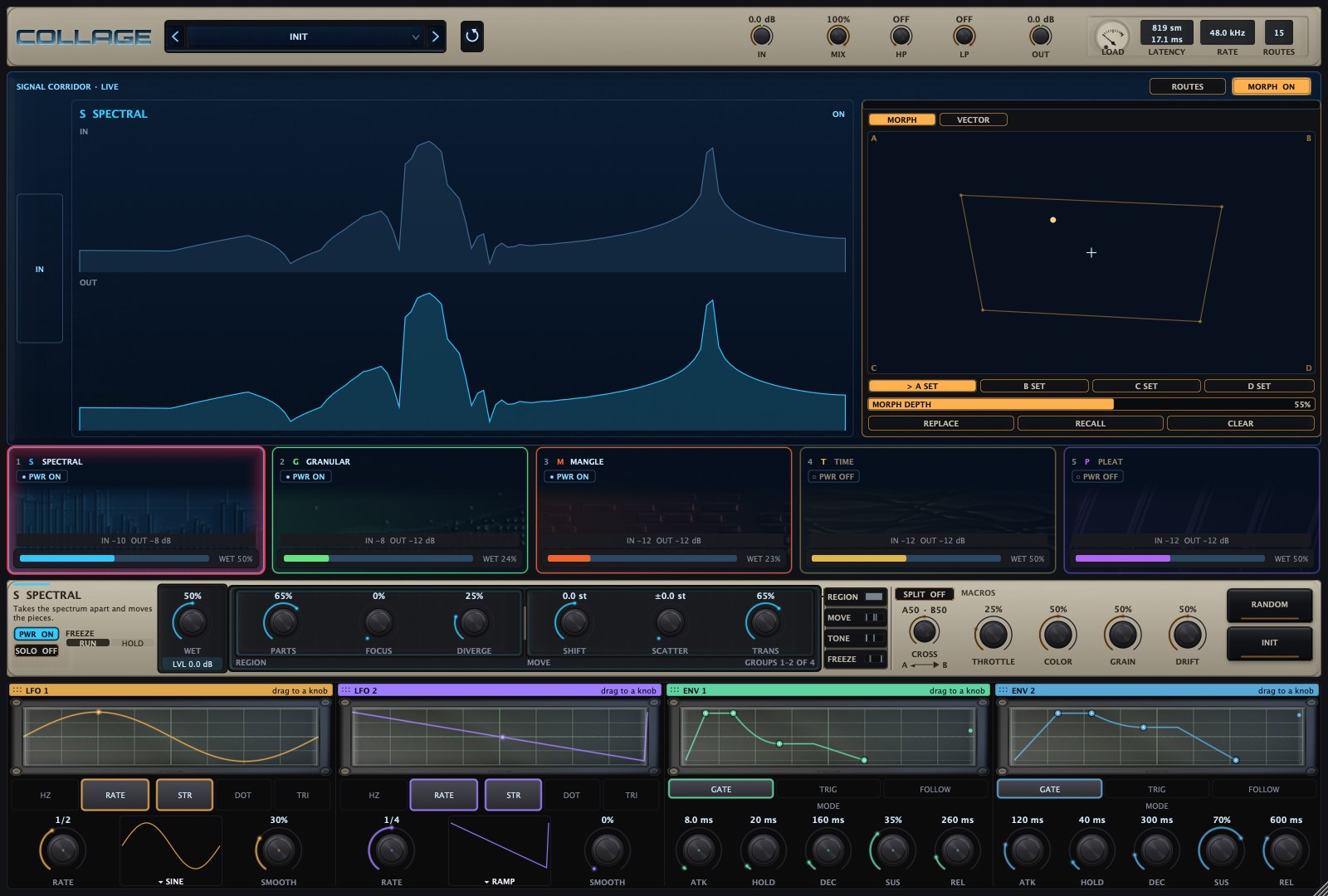
Overview
COLLAGE processes incoming audio through each of its five stations in turn, while its modulation sources reshape their controls over time. Every station is powered, ordered and blended independently, and the rack can divide into two parallel lanes.
SPECTRAL, GRANULAR, MANGLE, TIME and PLEAT run in the order the cards show. Reordering crossfades seamlessly, with no gap in the audio.
With SPLIT engaged, each station is assigned to lane A or lane B, and CROSS blends the two. Reported latency is identical to the serial rack.
Four input followers, two LFOs and two envelope followers route to almost any control, with up to 128 routes per patch.
Four scenes each hold a complete patch. The morph pad blends between them, and a vector path of up to 16 points travels through them over time.
THROTTLE, COLOR, GRAIN and DRIFT. Every factory preset assigns all four, and each macro can itself be a modulation destination.
Synced modulation and random events are keyed to musical position, so a bounce matches playback at any block size from 32 to 2048 samples.
Web demo
A browser version of the five stations with their principal controls, a reorderable chain and the four macros, applied to an E8 track. Select a station to reveal its controls.
Web approximation — not the full plug-in DSP
Takes the spectrum apart and moves the pieces.
Signal path: the audio passes through the five stations in the order the cards show, then through the MIX · HP · LP master section. The display shows the selected station’s processing; the other stations show their activity beside it.
Press Play, then click a station to show its controls. PWR turns a station on or off, ‹ › moves it in the order, and the four macros change several controls at once. SPECTRAL and GRANULAR start switched on.
Interface
Select a number to explore each region of the window. COLLAGE opens at 1300 × 878 and scales from 1120 × 700 to 2600 × 1756.
Preset browser and the master strip: IN, MIX, HP, LP and OUT. On the right, the LOAD dial, the reported latency, the sample rate and the number of active routes.
Draws the selected station from live analysis: SPECTRAL’s input and output spectra, GRANULAR’s grain field, MANGLE’s and PLEAT’s transfer curves, TIME’s slice ladder.
MORPH blends scenes A to D by position on the pad, scaled by MORPH DEPTH. VECTOR draws a path of up to 16 points that plays LOOP, PING, ONCE or SCAT. ROUTES opens the routing inspector.
The five stations in rack order, with power, input and output level and WET. Drag a card to reorder; with SPLIT on, each card chooses lane A or B.
The selected station’s controls: WET and LVL, then its named groups. Here SPECTRAL shows PARTS, FOCUS and DIVERGE (REGION) and SHIFT, SCATTER and TRANS (MOVE).
SPLIT runs the stations as two parallel lanes and CROSS blends lane A and lane B. The four macros are THROTTLE, COLOR, GRAIN and DRIFT. RANDOM and INIT on the right.
LFO 1, LFO 2, ENV 1 and ENV 2. Drag a slot’s header onto a knob to route it. LFOs are tempo-synced or free with nine waveforms; the envelope followers run in GATE, TRIG or FOLLOW mode.
Technical breakdown
The processing behind each station: its algorithm, key figures and the controls in the groups the plug-in presents. Every station also carries PWR, WET and a wet output level, LVL, from −24 to +12 dB.
Short-time Fourier processing
Divides the spectrum into regions and moves them: SHIFT transposes, SCATTER displaces regions by different amounts, and TILT leans the result. DIVERGE moves the right channel differently from the left while keeping the low end mono. HOLD keeps the spectrum that was sounding as a bed beneath the live signal, and at neutral settings the station is transparent.
Grain cloud
A grain cloud drawn from the station’s recent input, with up to 64 grains sounding at once and the cloud level-matched as density rises. PITCH can follow a scale, SYNC GRID places grain starts on the DIV division, and RANDOM LOCK keys the random draws to musical position so a bounce matches playback.
Multipolar waveshaper
A multipolar saturator: the wave is split at a movable line, and the positive and negative arms each run their own algorithm and shape, meeting at a hard seam. The result is anti-aliased and level-matched. QUANT widens into a gate above about 85% SHAPE.
Read head, transient shaper, slicer
A read head over the station’s recent input, a transient shaper and a slice re-sequencer behind one WET. RATE stops at the centre, reaches 2× at the ends and reverses on the left half. SHAPE punches transients to the right and smears onsets to the left, and WEAVE drives the slicer from gating through reordering, reversal and stutter.
Multipolar wavefolder
The second multipolar saturator: MANGLE’s split architecture with a bank of wavefolders and a smooth seam, for a smoother, warmer character. WIDE opens a mirrored right-channel arm, so asymmetry in the fold makes the station stereo while the mono sum keeps its body. WIDE is disabled on mono tracks.
Signal path
Audio passes through the stations once, in rack order. The control plane listens to the signal and moves the controls; it never processes the audio itself.
Control plane · up to 128 routes
SPECTRAL's resolution tier sets the latency; most presets use FAST. MANGLE adds 24 samples and PLEAT 27. The reported latency is constant through bypass, reordering and SPLIT.
| Tier | Samples at 44.1/48 kHz | ms at 48 kHz |
|---|---|---|
| LIVE | 435 | 9.1 |
| FAST | 819 | 17.1 |
| MID | 1587 | 33.1 |
| FINE | 3123 | 65.1 |
Factory library
INIT and sixteen themed banks, every preset voiced with all four macros assigned.
Updates
The changes in recent COLLAGE builds, newest first. Builds marked “In testing” are with testers and are not yet the download.
Specifications
Waitlist
Get release news about COLLAGE by email.
We use your email only for product updates. See our privacy policy.