COLLAGE technical guide
This guide explains what COLLAGE does under the panel, for sound designers who want to know why a control behaves the way it does and what the instrument promises. It is a description of the shipped 0.1.0 engine, not a wish list. Control names are written the way the panel spells them; the host’s automation names are in the Glossary, and the Tutorials put the same controls to work step by step.
1 · The signal path

Audio moves forward, once:
IN → input trim → [ SPECTRAL · GRANULAR · MANGLE · TIME · PLEAT ] → MIX → HP → LP → output trim → ceiling → OUTInput trim. IN applies ±24 dB before anything else. Input peak and RMS are metered here, and every follower and analysis lane reads the trimmed signal, so IN is also the one gain that changes how the control plane hears you.
The rack. The five stations run in the order the cards show. Rack order and each station’s power are structural state: they are saved with the session and the preset, but they are not automation parameters and cannot be modulated. Reordering crossfades the seam toward the latency-matched dry signal, so there is no hole; the reported latency is the same in every order.
Power and WET. A station’s power is a gain on an engine that keeps running: pressing PWR starts a short, click-free 10 ms fade over the station’s WET amount. Because the station never stops, its internal history is always current, and a station brought back into the stream sounds like it had been there all along. WET blends the station’s complete output against its own input. In TIME, the read head, the transient shaping and the slicer all render their full effect before that single blend, so WET at 100 % is the complete effect and WET at 0 is bit-exact dry.
LEVEL. Each station’s LVL, under its WET, is a gain on the station’s processed signal alone, −24 to +12 dB, applied before the WET blend. The dry arm never passes through it, so it changes how loud the effect is without driving the effect any harder, and a change glides rather than steps. At 0 dB, the default, it is skipped entirely. Each station card reads the station’s measured input and output level and highlights an output peak above unity, so a stage that builds up gain is easy to find.
SPLIT and CROSS. SPLIT runs the same five stations as two parallel lanes. Each station belongs to lane A or lane B, chosen with the LANE chip that appears on its card, and CROSS blends the two lane outputs from all-A to all-B. CROSS is smoothed, so it is a musical control that can be modulated; SPLIT itself is a topology switch and rides the structural seam like a reorder. The reported latency is the same as the serial rack.
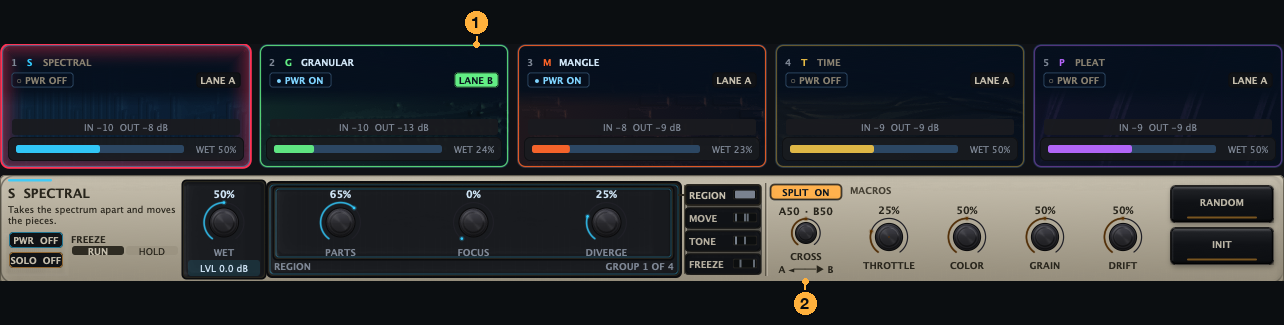
Master stage. After the rack:
- MIX blends the rack against the dry input. The dry side is delayed by the rack’s reported latency, so 50 % is a real half-and-half rather than a comb filter.
- HP and LP are 12 dB-per-octave filters with no resonance. HP sweeps 20 Hz to 2 kHz and LP 800 Hz to 20 kHz (the top follows the sample rate below about 44.4 kHz). The frequency each shows is the filter’s −6 dB point, so the −3 dB corner sits at 1.55 times that frequency for HP and 0.64 times it for LP. Each has a true bypass at the end of its travel: at HP = OFF or LP = OFF the filter is out of the path and the audio is bit-exact.
- OUT applies ±24 dB.
- The ceiling is a zero-latency soft limiter, transparent below its threshold. It holds sample peaks under the session’s ceiling level, −0.3 dBFS by default (peaks settle about 0.35 dB under that level), and the CEIL lamp in the head band lights while it is working. A level-matched grain cloud or a hard fold can raise the crest factor of pathological material, and the ceiling bounds that at the ceiling level in the samples. It is a sample-peak ceiling, not a true-peak limiter, so inter-sample peaks can exceed it by several dB. If a delivery format needs a true-peak limit, put a true-peak limiter after COLLAGE.
Channels and buses. Mono and stereo tracks are both supported; the one control that needs two channels, PLEAT’s WIDE, is disabled with a reason on a mono track. The optional Sidechain input bus is control-only: it feeds the envelope followers that are set to the SC tap and nothing else; it never reaches the audio path. COLLAGE takes no MIDI in 0.1.0.
Nothing is captured. SPECTRAL, GRANULAR and TIME always listen to the last few seconds of the stream (four seconds for the grain cloud and TIME). They are always current, they need no arming, and no control exposes them as an object: a fresh insert at POSITION 100 % simply hears silence for four seconds. No control value is ever rendered as audio, and no observed audio is ever fed back into an input.
When the host stops. An explicit transport stop clears the wet residue, and within a fraction of a second the instance behaves like a fresh insert of the same patch. The dry path is never gated, so a stopped host with a monitored instrument keeps working, and offline bounces keep their tails. A single clip stopping while the transport rolls is invisible at the plugin boundary, so tails ring out musically there, which is the authored patch.
2 · The stations
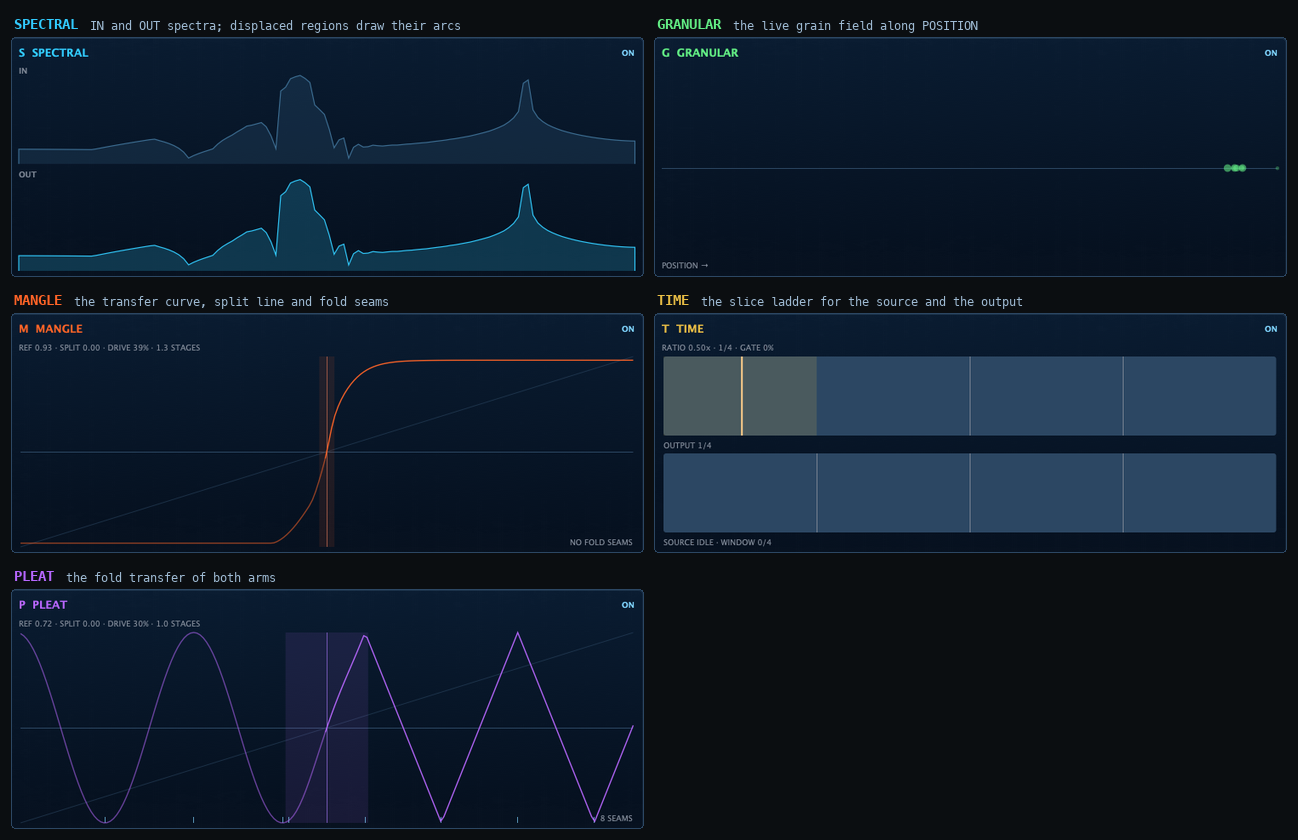
Each station has a group ladder of two to five named groups; the first group is its performance group. The corridor’s pane draws the focused station from live telemetry, never from a simulation: SPECTRAL’s in and out spectra with the arcs of its displaced regions, GRANULAR’s grain field along the POSITION axis, MANGLE’s and PLEAT’s transfer curves evaluated from their own settings, and TIME’s slice ladder. A station that is powered off draws only what its settings determine, and offers a POWER button.
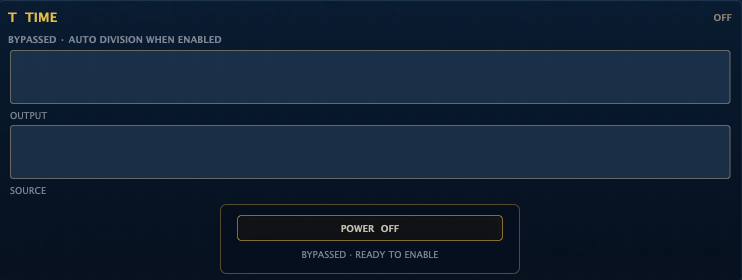
SPECTRAL
A spectral engine that cuts the spectrum into regions and moves them. At neutral settings it is transparent, delayed by the reported latency; it is not bit-exact, but nothing audible happens until a control leaves zero.
- REGION. PARTS decides how finely the spectrum is segmented, from broad bands to one region per partial. FOCUS scopes HOLD: at 0 the whole spectrum is held, at 100 % only the regions within 12 dB of the loudest, so a held chord can sit under live hats. DIVERGE displaces the right channel’s regions differently from the left while keeping the low end mono-coherent whatever SHIFT does. It acts only while SCATTER is above 0.
- MOVE. SHIFT moves every region by up to ±24 semitones. TRACK chooses the law: at 100 % the shift is proportional (a transposition), at 0 it is the same offset in Hz for every region (inharmonic), and the two agree at 440 Hz so morphing TRACK is smooth. SCATTER gives every region its own random displacement inside a ±12 semitone bound; the draws are repeatable on every pass and bounce. Low partials scatter progressively less toward the bottom of the spectrum; they are not excluded. TRANS handles onsets: on a transient COLLAGE re-anchors the sound and cuts the BLUR and SMEAR tails, so attacks arrive intact.
- TONE. TILT is a real slope of up to ±6 dB per octave, referenced to 1 kHz. An automatic energy compensation then rebalances the sound, so 1 kHz is not a fixed pivot: the 0 dB point moves to wherever the material’s energy balances. On a flat spectrum, full positive TILT leaves 1 kHz about 12 dB down and 4 kHz unchanged. BLUR spreads energy across neighbouring frequencies; the spread widens progressively as the control rises. SMEAR is temporal inertia: magnitudes release with a time constant from nothing up to 2 seconds while transients still pass. At full SMEAR a held sound falls 8.7 dB every 2 s, so the audible decay runs about 14 s to fall 60 dB.
- FREEZE. HOLD, on the apron’s mode segment, holds the spectrum that was sounding when it engaged as a bed and blends it with the live signal; as a route destination it is continuous, so an envelope can fade the bed in. RATE drifts the displacement field, so a SCATTER pattern moves instead of freezing, and BLUR breathes with it.
- RESOLUTION is SPECTRAL’s analysis tier and the plugin’s only latency control. See section 6.
GRANULAR
A grain cloud read from a four-second rolling history of the station’s input, with up to 32 grains overlapping.
- CLOUD. SIZE sets each grain’s length, 5 to 500 ms. DENSITY is the overlap, 0.25 to 32; from about 2 overlapping grains upward the cloud is level-compensated, so DENSITY changes the texture, not the loudness. Below about 2 the cloud is sparse and is not boosted: it gets quieter as DENSITY falls, by up to about 12 dB at 0.25. POSITION chooses where in the history the grains read: 0 is now, 100 % the oldest reach.
- PITCH. PITCH transposes every grain ±24 semitones; SCATTER adds a random offset per grain; SCALE snaps the result to octaves, fifths, major, natural minor, harmonic minor or chromatic steps.
- FIELD. SPRAY randomises the read position per grain, with fine control at the low end. SPREAD places the grains across the stereo field; at 0 every grain reads both channels at the same position, so the output channels are bit-identical when the input channels are (a mono or dual-mono source), and a stereo input keeps its own image. JITTER randomises grain size.
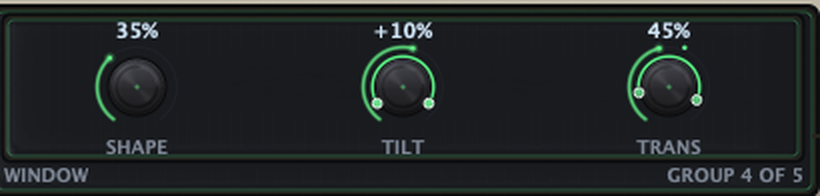
- WINDOW. The grain envelope is a smooth window: SHAPE sets the flat top, TILT skews attack against swell, and TRANS pulls grains toward the present on an onset, so attacks keep their definition.
- MOTION. REVERSE is the probability a grain plays backwards. HOLD parks the history so the cloud keeps reading the same four seconds; it outranks a bypass, so a bypassed station cannot overwrite what you are holding, and RELEASE HOLD in the pane resumes. DIV is the grid division GRID snaps grain starts to.

SYNC has two states, OFF and GRID; GRID quantises spawn instants to the DIV division. Beat-repeat is TIME’s job, so there is no BEAT mode here. RANDOM, a structural setting, chooses how the cloud’s random draws are keyed: LOCK, the default, keys them to the musical position so a bounce from bar 33 matches a pass from bar 1. GRANULAR adds no latency.
MANGLE and PLEAT
The waveform is split at a movable, level-referenced line into a positive and a negative arm, and each arm runs its own algorithm at its own shape. SPLIT is a safe modulation target rather than a click generator.
- DRIVE is 1× to 8× of input gain into the curve. Automatic level compensation returns the wet path to its dry level, so DRIVE, SHAPE and STAGES change the spectrum rather than the loudness; WET is the station’s real gain stage.
- STAGES runs the waveform through the curve one to four times, continuously: fractional stages crossfade, and each stage’s shape scales automatically with the stage count, so several gentle passes stay smoother than one hard one.
- SPLIT moves the line between the arms; 0 is the zero crossing.
- ARM + and ARM − each carry a shape (SHAPE or FOLD) and an algorithm selector. The selectors are static: stepping an algorithm under modulation would be a discontinuity, so they are not route destinations.
MANGLE is the harder, brighter station: a waveshaper bank (THRU · SOFT · CLIP · DIODE · CHEBY · RECT · QUANT) with a hard seam. QUANT becomes a musical gate above about 85 % SHAPE. PLEAT is the smoother, warmer one: a fold bank (THRU · MIRROR · SINE · CREASE · WRAP · LEDGE · STEP) with a smooth seam. PLEAT’s WIDE makes the right channel fold differently from the left; with it open, asymmetry in the fold is what makes the station stereo, and the mono sum keeps the odd-harmonic body. Both stations are alias-controlled and DC-safe, and add a small constant latency, included in the reported figure.
TIME
A read head over a four-second rolling history, a transient shaper and a slice re-sequencer, behind one whole-station WET.
- READ. RATE is the playback rate on a geometric taper: FREEZE at the centre, unity near the ends of each half, up to 2× at the ends, the left half in reverse. With SYNC at RATIO it snaps to ten musical ratios (1/8 · 1/6 · 1/4 · 1/3 · 1/2 · 2/3 · 3/4 · 1 · 3/2 · 2), which is the difference between a phrase that stays on the grid and one that drifts a sixteenth every four bars. POS is the read position inside the WINDOW; SCRUB decides whether a POS move JUMPs the head or slides it like TAPE, adding the move’s velocity to the pitch.
- SPLICE. SHAPE is transient shaping with an exactly-off centre: PUNCH to the right, SMEAR with onset dispersion to the left. With SHAPE GUARD on, the default, positive SHAPE adds at most 2× transient gain before WEAVE, so hard punch cannot slam the output safety stage; OFF restores the original 8× range. The centre and SMEAR are unaffected, and sessions saved before the guard existed open with it on. WEAVE drives the slicer as one control, least destructive facet first: gating, then reordering, then reverse from 35 %, then stutter from 72 %. It starts after a quarter bar of enabled audio and fades in over at most a further quarter bar; at a longer DIV it waits until it has a whole slice of that division to play. WINDOW is the span of history the read head traverses: FREE, or 1/4 to 4 beats at the host tempo. A beat window cannot exceed the available history, so it follows the tempo only where it fits: 4 beats lock above about 62 BPM, 2 beats above about 31 and 1 beat above about 16 (RATE moves these slightly), and below that the window stops at the length of the available history.
- PITCH. PITCH transposes both the stretched read and the slices. TIMBRE is a tilt corrector that takes the colour out of a pitch shift; TRACK ties it to the opposite of PITCH, within TIMBRE’s own ±12 semitone span: PITCH reaches ±24 semitones, so beyond ±12 the correction stops growing. It corrects tilt, not formants, and is never labelled as more than that.
- GRID. SYNC (FREE / RATIO), DIV, the slice division WEAVE works on (AUTO lets WEAVE choose the division), and SWING.
- REPEAT. REPEAT latches the newest REP DIV division and repeats it. It is ready after one division of enabled audio, not one bar, and it is audible with WEAVE at 0. Because REPEAT is a route destination, a synced LFO on it is a rhythmic stutter.
TIME adds no latency. With a locked WINDOW, its random choices are reproducible from any transport position.
3 · The control plane

The control clock. The engine runs all modulation on its own fixed-rate clock, independent of the host’s buffer size. Every source is read and every route applied on that clock, which is why a render is bit-identical at any buffer size from 32 to 2048 samples, modulated parameters included.
Input followers. Four lanes read the trimmed input on the control clock: in.level, in.transient, in.tone (a signed tilt, dark to bright) and in.noise. in.noise is a high-frequency-energy index, not a noisiness measure: white noise reads about 0.67, and a bright tone reads alike. The followers have no selector by design; silence produces their exact neutral value, and they are causally upstream of everything the routes touch.
LFO 1 and LFO 2. With RATE selected the LFO is locked to the host tempo through an eleven-step ladder from 8 bars to 1/128, with STR, DOT and TRI feel; with HZ it runs free from 0.02 to 20 Hz. A bar is always four beats here and in the VECTOR clock and WEAVE: COLLAGE does not read the host’s time signature, so in 3/4 or 6/8 a 1 BAR cycle is still four beats long. Nine waveforms: SINE, TRI, SAW and SQR, four drawn contours (RAMP, PULSE, SIDECH, STAIRS), and CUSTOM, a sixteen-point table drawn on the slot’s scope. SMOOTH low-passes the output, up to 250 ms. A synced LFO derives its phase from the musical position, so it reproduces exactly under loops, locates and bounces; a free LFO is the one source that does not.
ENV 1 and ENV 2. Attack-hold-decay-sustain-release followers with three modes. GATE holds the envelope open while its source is above the threshold and releases when it falls 5 dB below; TRIG fires one shot per transient; FOLLOW tracks the level with attack and release, where ATK and REL are time constants rather than travel times: the envelope covers 63 % of the distance to the level in that time and 99 % in about 4.6 times as long, whereas in GATE and TRIG they are the full length of the segment. Each envelope listens to one of four taps, IN (default), SC (the sidechain bus), WET or OUT. The gate threshold defaults to −38 dBFS. TRACK moves the gate relative to the material’s own recent average and SENS sets how strong a transient must be to retrigger. The panel shows the five AHDSR values and MODE; tap, threshold, tracking and sensitivity are held in the session and appear in the host’s parameter list. For material that is deliberately amplitude-modulated, FOLLOW is the honest mode; no absolute threshold is level-stable on a wobble.
Analysis lanes. Twelve lanes measure the stations as they process. SPECTRAL’s centroid, flux and brightness read its output. GRANULAR’s level reads its output, and its density is how many of the available grains are sounding. MANGLE’s two lanes are the level entering the shaper and its shaping activity, how far the shaper moves the signal from its input. TIME’s transient strength and envelope read the signal entering TIME, not its output, and its read-phase lane is the read head’s own position. PLEAT’s fold activity and split asymmetry come from the fold core. GRANULAR’s, MANGLE’s and TIME’s lanes follow the stereo energy rather than a mono sum, so wide or opposite-polarity material never reads as silence; SPECTRAL’s lanes analyse a mono sum of the two channels, so material that is in antiphase between the channels reads as silence there. A lane is live whenever a route demands it, including while its station is bypassed, so a route can never draw a live-looking dead meter.
What a lane reads at rest. Unless the route’s REST point says otherwise, a route reads each analysis lane as its distance from 0.5. Under silence nine of the twelve lanes publish 0, not 0.5: the three SPECTRAL lanes, GRANULAR’s level, both MANGLE lanes, TIME’s transient and envelope lanes and PLEAT’s fold activity. PLEAT’s split lane rests at 0.5, GRANULAR’s density rests at the level DENSITY sets (a low value at the default, and 0 while GRANULAR is bypassed), and TIME’s read phase is a free-running ramp. A route in BIPOLAR polarity from a lane that rests at 0 therefore reads its full negative excursion until material arrives; POSITIVE polarity reads none.
Macros. THROTTLE, COLOR, GRAIN and DRIFT are four knobs on the apron, four control sources, and four destinations. Within one control tick the macro destinations are resolved first, so a route from an LFO into a macro reaches everything the macro drives in the same step. A macro may not drive another macro. Every factory preset routes all four to audible destinations, measured against a two-metric audibility gate rather than asserted.
Scenes and the morph. Four scenes, A to D, each hold a whole patch: STORE writes the current patch in (over a scene that is already stored the key reads REPLACE, and undo restores the old scene), RECALL moves the morph onto that scene at full depth, CLEAR empties it. The MORPH panel opens on a fresh insert and when INIT loads; a session saved with it closed reopens closed. The morph pad’s position and MORPH DEPTH blend the held scenes; the weights glide over 25 ms. Editing a knob while a morph is active writes through: the edit moves the heard value once, and the held scenes take up the change in proportion. Quantised selectors and structural settings are never morphed.
VECTOR. Up to sixteen points on the pad make a path that a playhead travels; LOOP closes the shape, PING runs it back and forth, ONCE runs it a single time, SCAT jumps between the points in a seeded order. Timing is even across segments, so a figure’s rhythm is its point order. The clock is the LFOs’ (HZ or RATE with STR, DOT and TRI) plus a ×1 to ×16 multiplier, and VEC scales the travel. The playhead publishes path.x, path.y and path.progress as sources; LINK authors two ordinary routes from X and Y to the morph position, visible and deletable like any other. Below two points the axes are inert and the panel says so. Every point is authored by hand; nothing on the pad is ever derived from audio. On the pad, a click on empty space places a point, a click on a point selects it and a double-click deselects it, a drag moves a point, alt-click or right-click removes one, and dragging the crosshair moves the morph position by hand.
4 · Routing

A route connects one source to one destination. A patch holds up to 128, and every one carries the same settings: DEPTH, MIN and MAX in the destination’s own units, a CURVE, a POLARITY, a COMBINE mode, a SLEW time and a REST point.
Evaluation, once per control tick. Each source is read relative to its rest point; polarity, curve and slew are applied; the value is mapped into MIN to MAX (ADD uses only the width of that span, see below); the routes into one destination are combined in their listed order; macro destinations are resolved first, so a route into a macro reaches everything that macro drives in the same step; the result is clamped once to the control’s hard limits. ADD and MULTIPLY are neutral at rest, so a resting source leaves the control exactly on its stored value. REPLACE, MIN, MAX and SPAN move a resting control by design: REPLACE lands on the source’s mapped rest value, MIN caps and MAX floors the running value there, SPAN sweeps from MIN to MAX as the source rises. ADD does not land inside MIN to MAX: it adds the shaped source value (−1 to +1) times DEPTH times half the width of the span to the stored value, so it ignores where the span is centred, and its reach is the stored value plus or minus that offset, limited only by the control’s hard limits. The arc drawn on the knob shows MIN to MAX; for an ADD route it shows the width of the reach, not its position. A routed control bypasses the base parameter smoother, so the route’s SLEW is the only smoothing a routed control receives; un-routed automation keeps the base smoother.
Authoring. Drop a chip on a knob and a route appears as an arc on the knob at a conservative depth over the middle of the control’s range. The arc’s handles set MIN and MAX, the arc body moves the range, and a double-click removes the route. The ROUTES inspector shows every route in the patch, lets you pick any source family and any destination, and edits depth, range, curve, polarity, combine mode, slew and rest with the values in the control’s units.
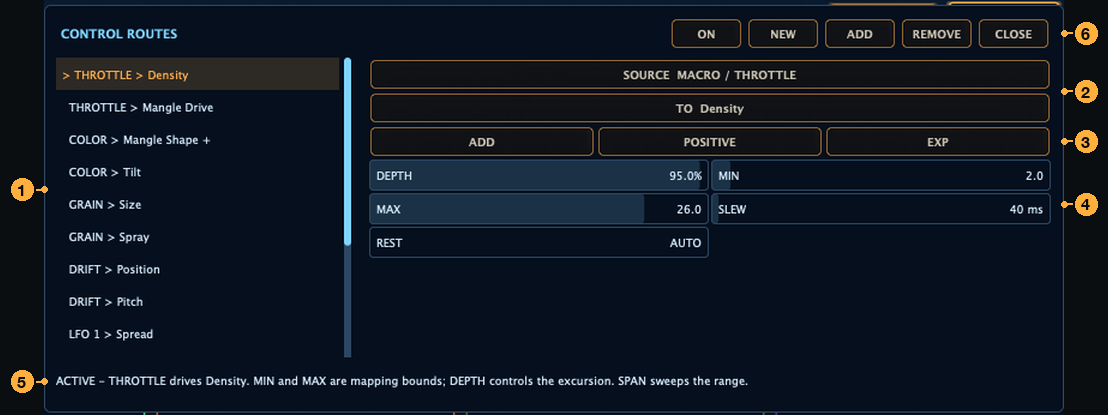
Destinations fail closed. A route may target a control that is a modulation destination, is implemented in the current engine, and reaches an audible station or an always-audible trim; a macro qualifies transitively through what it drives. Power latches, algorithm selectors, TIME’s three modes and the structural settings are refused. A route whose station is bypassed, whose macro has no audible target, or whose source the session cannot provide is kept, listed inactive, and explained in the inspector’s status line; it is never drawn as live. Unipolar sources (the envelopes, the input followers, THROTTLE) refuse NEGATIVE polarity, which would be a permanently dead route.
5 · Determinism and sync
COLLAGE makes three promises about reproducibility.
- Buffer-size invariance. The same session renders bit-identically at any host buffer size from 32 to 2048 samples, including power cycles, reorders, CROSS moves and every modulated parameter.
- One seed. Every random process derives from a single seed stored with the session, so the same seed and transport position always make the same choices.
- Reproduction from any transport position. Every LOCK-mode system re-derives its state from the musical position, so a bounce that starts at bar 33 renders the same bars as a pass from bar 1: GRANULAR under RANDOM = LOCK, TIME under a locked WINDOW, SPECTRAL’s field, synced LFOs and the vector.
The exceptions are named. LFOs and the vector in HZ mode free-run, and all three default to synced, so the default configuration has no exception. TIME at WINDOW = FREE has no musical instant to key on. SPECTRAL’s HOLD holds whatever was sounding when it engaged, so a pass that starts already held has nothing to reproduce. GRANULAR’s RANDOM = FREE counts grains since the last reset rather than bars. Anything with no transport at all free-runs from its reset, which is what an unclocked host has always had.
The control plane keeps running through a transport stop, so meters stay honest and a resume re-anchors exactly; the audio plane closes as section 1 describes.
6 · Latency
SPECTRAL is the only station whose latency varies, so the one latency control is its RESOLUTION tier. GRANULAR and TIME add nothing; MANGLE and PLEAT add a small constant latency, included in the figures below.
| Tier | 44.1 / 48 kHz | 88.2 / 96 kHz | 192 kHz |
|---|---|---|---|
| LIVE | 435 samples (9.1 ms at 48 kHz) | 819 | 1587 |
| FAST (default) | 819 samples (17.1 ms at 48 kHz) | 1587 | 3123 |
| MID | 1587 samples (33.1 ms at 48 kHz) | 3123 | 6195 |
| FINE | 3123 samples (65.1 ms at 48 kHz) | 6195 | 12339 |
The latency of each tier is fixed in time, so the sample count doubles with the sample rate. The reported latency is exact and constant at every tier and rate. It is constant through bypass, reorder, SPLIT, every parameter and every modulation value, because releasing latency on a bypass would turn a performance gesture into a host renegotiation. Changing the tier briefly fades the output; it is the one named exception to the no-discontinuity rule. RESOLUTION is structural, held in the session and never automated; the 0.1.0 panel does not carry a control for it. Most factory presets leave it at FAST. Fourteen choose another tier, and loading one of them changes the latency COLLAGE reports to the host: Torn Cloth (05 Spectral Drift) runs at LIVE; Throat Radio (02 Reese Foundry) and eight presets from 05 Spectral Drift (Tectonic Shear, Anchor And Aerial, Harmonic Ladder, Quarter Tone Crawl, Octave Floor, Salience Focus, Air Lift and Ghost Grid) run at MID; Glacier Bed, Diffuse Horizon, Whisper Bed and Slow Pane (05 Spectral Drift) run at FINE.
7 · State, presets and compatibility
One snapshot. A preset or a host session holds the whole instrument: every parameter value, the rack order and each station’s power, the SPLIT lane map, the compiled route table, the four scenes, the vector’s points, the custom LFO tables and the seed. A preset loads as one atomic step: new parameters are never mixed with old routes, and a removed route never leaves a destination latched.
Files and folders. Presets are .clgpreset files in Documents / COLLAGE Presets: the factory banks under Factory/<bank>/, your own saves in the folder itself, and anything you IMPORT copied there. The factory content is 336 presets: INIT and sixteen themed banks. On disk INIT’s file sits in a folder of its own, Factory/00 DEFAULT/, which the LIBRARY lists as the SYSTEM row INIT rather than as a bank. INIT, the patch a fresh insert opens on, runs GRANULAR and MANGLE with fifteen routes, four stored scenes and a linked four-point vector; BLANK, reached by RESET BLANK, is the neutral instrument with every control at its default and no routes. Undo covers edits, route changes and preset loads. Non-parameter changes such as a reorder or a new route mark the host session dirty like any knob move.
Automation. Every parameter has a stable identity that is never renumbered or re-meant across versions, so saved automation and preset files keep working. The names a host shows are the ones the glossary lists. Parameters retired by earlier versions still exist for old sessions, presented as Legacy · … and flagged to the host as not automatable. They stay in the plug-in’s parameter list in AU and VST3 (the flag does not remove them), so whether a DAW shows them in an automation menu depends on how that host treats the flag. The structural settings and the two output-stage switches (safety and ceiling) are likewise listed but not automatable.
Older sessions. Every session ever saved still opens. Sessions saved by earlier COLLAGE versions open in a compatibility mode, marked LEGACY: their sound is finite and latency-correct, and the current verbs (route authoring, INIT, RANDOM) refuse with a reason. Loading a current preset into such a session moves it onto the current engine. The reverse is not symmetric: opening a current session in an earlier build keeps its values but not its sound.
The panel and the window. COLLAGE has one look, DECK; the window size (1120 × 700 to 2600 × 1756, free aspect) is remembered per instance. Every control has a role, a name and a description for assistive technology, every state carries a word as well as a colour, and the panel takes no keyboard shortcuts so the host keeps every key.
8 · Formats and requirements
| macOS | Windows | |
|---|---|---|
| System | macOS 11 or newer, Apple Silicon and Intel (universal) | Windows 10 or 11, 64-bit |
| Formats | Audio Unit, VST3, standalone application | VST3, standalone application |
| Installer | COLLAGE-0.1.0.pkg, Developer ID signed and notarised, and COLLAGE-0.1.0-bundles.zip, a manual ZIP of the notarised bundles | COLLAGE-0.1.0-Windows-x64.exe (needs administrator rights) and COLLAGE-0.1.0-Windows-x64.zip, a manual ZIP; not yet publisher-signed |
| Plug-in paths | /Library/Audio/Plug-Ins/Components, /Library/Audio/Plug-Ins/VST3, /Applications | C:\Program Files\Common Files\VST3, C:\Program Files\E8 Audio Labs\COLLAGE |
| Presets | ~/Documents/COLLAGE Presets | Documents\COLLAGE Presets |
| Licence | An E8 Audio Labs account holding a COLLAGE licence, two computers at a time (section 9) | The same |
Sample rates from 44.1 to 192 kHz are supported, with the latency table above. Mono and stereo tracks, an optional stereo sidechain bus, no MIDI. The whole rack with the control plane live is sized for one core at 48 kHz; the LOAD dial in the head band shows the engine’s share.
The manufacturer is E8 Audio Labs (E8AL); the plug-in code is Clg1.
9 · Licensing
COLLAGE is licensed per E8 Audio Labs account, with two computers active at a time. Its licence is its own: a MOSAIC licence does not open it. Activation happens inside the plug-in through the browser, as Getting Started describes, and COLLAGE never opens a browser by itself: only a press on ACTIVATE (or OPEN BROWSER AGAIN) or YOUR PRODUCTS does.
The gate. Authorization is checked at the output stage, after the engine. When COLLAGE is allowed to process, the stage is bit-transparent: it touches no sample. When it is not, the output crossfades over 20 ms, starting at a block boundary, to the latency-aligned dry signal, the same samples a host bypass produces, so audio still passes, unprocessed. The engine keeps running underneath, the reported latency never changes, and an activation ramps straight back to the processed sound over the same 20 ms. The test suite holds an unlicensed instance to the bypass output bit for bit, at the same latency.
When it is checked. Inserting COLLAGE or scanning a plug-in folder never waits for the licence check, the keychain or the network. When the host prepares to play, COLLAGE waits at most two seconds for the check of the licence already on this computer, never for the network; until that check resolves it passes the dry signal. The audio thread reads one stored decision per block and does no licensing work of its own.
What the card says. The activation card appears over the window whenever COLLAGE may not process (a check that is still pending is given about a second and a half first), and its headline names the reason:
| Headline | The line beneath it |
|---|---|
| Pending verification… | Checking this computer’s license. Audio passes through until it resolves. |
| Activation required | Your project and settings are safe. Audio passes through unprocessed. |
| Waiting for approval | The code to confirm, and where: “Confirm this code at e8audiolabs.com/activate”. |
| License revoked | This license was withdrawn. Your project and settings are untouched. |
| Clock check needed | This computer’s clock is behind. Reconnect to verify the time. |
The card takes every click on the window while it is up, so nothing underneath changes by accident; it is a part of COLLAGE’s own window, not a dialog, so the host and its transport keep running.
The licence on the computer. The E8 Audio Labs licensing service gives an activated computer a signed licence that renews about once a day and lasts up to 72 hours, so COLLAGE works offline for up to three days at a stretch. It is kept in the user’s own application data (~/Library/Application Support/E8 Audio Labs/Licensing on macOS, %LOCALAPPDATA%\E8 Audio Labs\Licensing on Windows), never in Documents, presets or DAW sessions, so a project or preset you share carries no licence. Deactivating a computer in Your Products frees its place straight away; the licence already on that computer keeps working until it runs out. If both places are taken, the activation page says so and asks you to deactivate one first.