Getting started with TEMPER
TEMPER is a physical-modelling instrument. It uses no recordings: you choose an instrument, what it is made of and how it is played, and every note is modelled as you play it. The factory library holds 115 programs in fourteen families, from a classical guitar and a grand piano to a marimba, a floor tom and a church bell, with string-orchestra and guitar-ensemble sections that sit together on one Stage.
What TEMPER is
Every program is one instrument, and its page is drawn for that instrument.
- A picture of the instrument. Each program shows a photoreal picture of its own instrument, with the point where the note is played marked on it.
- How it is played. Pluck, strike or bow; the finger, pick or mallet; how hard and how firmly; and where on the instrument. Every value reads in words, such as a little way from the bridge.
- What it is made of. The string or surface material, how long it rings, its tone, and how much the body resonates.
- The material pad. Two named axes and four named corners for each program. The home corner is the program as voiced; the mod wheel moves the vertical axis.
- Four macros on the front panel, each named for what you hear.
- The Stage. A bowed or plucked program can play as a section of up to 16 players, seated in a hall with the other sections in your project, with a conductor. Orchestrate turns one line or chord into a part for every section.
TEMPER and TEMPER FX
TEMPER comes as two products in one installer.
| Product | Type | Formats | Audio |
|---|---|---|---|
| TEMPER | Instrument | VST3, AU, Standalone | Stereo out. An optional stereo input, off by default, lets audio excite the notes you hold. |
| TEMPER FX | Effect | VST3, AU | Stereo in, stereo out. Your audio plays the instrument. |
Both open the same editor and the same factory programs. TEMPER FX adds an input mode, an input trim and a dry level; the technical guide covers them.
What you need
- A Mac running macOS 11 or later, with Apple silicon or an Intel processor. Every bundle is universal.
- A host that loads Audio Units or VST3 plug-ins, or the standalone TEMPER.app.
- A sample rate from 44.1 to 192 kHz.
- A MIDI keyboard is optional: the editor has one of its own. A keyboard with aftertouch, an MPE controller or a breath controller opens up more of the instrument.
Install
- Quit your host.
- Open the TEMPER installer package and follow its steps. The package is signed and notarized. It installs:
| What | Where |
|---|---|
TEMPER.component, TEMPER FX.component (Audio Units) | /Library/Audio/Plug-Ins/Components |
TEMPER.vst3, TEMPER FX.vst3 | /Library/Audio/Plug-Ins/VST3 |
TEMPER.app (standalone) | /Applications |
| The manual, a copy of the factory presets, and demos | /Library/Application Support/E8 Audio Labs/TEMPER |
- Start your host again and rescan if TEMPER does not appear. In Logic Pro, use Settings ▸ Plug-in Manager; in Ableton Live, Settings ▸ Plug-Ins ▸ Rescan. TEMPER and TEMPER FX are listed under E8 Audio Labs.
The installer replaces any TEMPER already in /Library/Audio/Plug-Ins and /Applications. A copy you placed yourself in your own ~/Library/Audio/Plug-Ins is not touched: remove it, or your host may keep loading it. A host that had TEMPER open keeps the old copy until the plug-in is reloaded.
Removing TEMPER
Delete the four bundles from the two plug-in folders above, TEMPER.app from /Applications, and the folder /Library/Application Support/E8 Audio Labs/TEMPER. Your own presets live in ~/Library/Audio/Presets/E8 Audio Labs/TEMPER; delete them only if you no longer want them.
The window at a glance
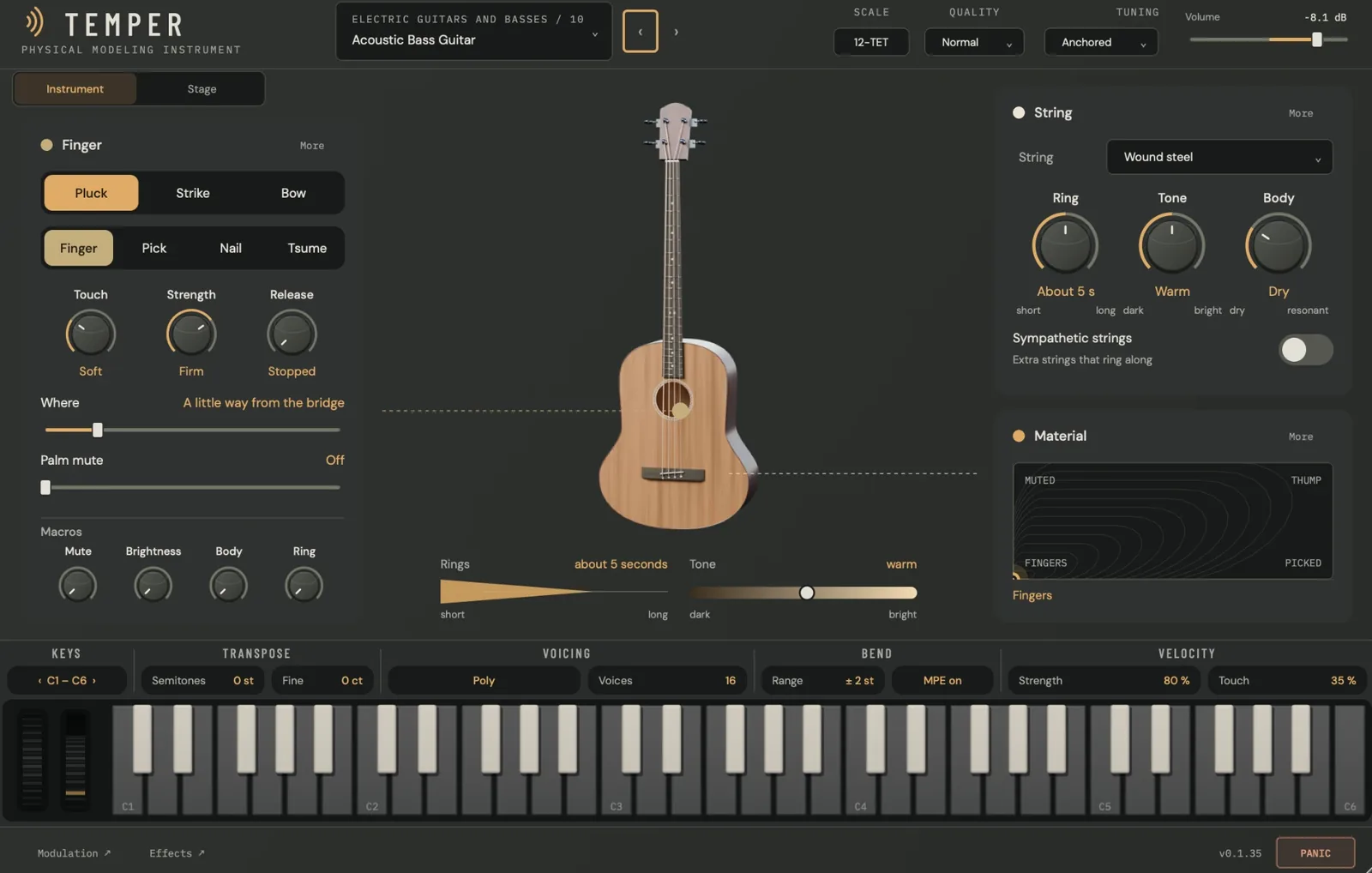
The window has four bands, top to bottom: the header, the page, the keyboard strip and the footer. It opens at 1160 × 740 and resizes freely from 900 × 600 up to 2200 × 1400.
The header
- Preset box. The family and program number above the program’s name, for example ELECTRIC GUITARS AND BASSES / 10 over Acoustic Bass Guitar. Click it to open the Library; the ‹ › arrows step through the programs. A dot before the name means you have changed the program since it was loaded.
- SCALE. The tuning in force, 12-TET by default. Click it for the tuning menu: load a Scala scale or keyboard map, or follow an MTS-ESP master. The technical guide explains it.
- QUALITY. Eco, Normal or High: higher resolves more detail for more CPU. Every factory program uses Normal.
- TUNING. Anchored keeps every note at its target pitch; Free lets the instrument’s body pull the pitch, as a real one does.
- Volume. The level TEMPER hands your host, in dB.
Under the header, Instrument and Stage switch between the instrument’s page and its section on the Stage. The Stage tab appears on programs that can play as a section.
The page
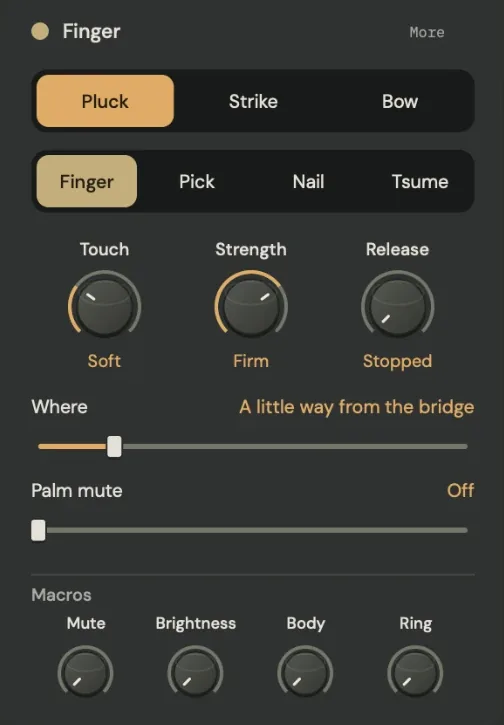
The playing card (left) is named for what plays the note, such as Finger, Pick, Bow, Hammer or Mallet, and follows your choice of tool.
- The first row is the style of playing: Pluck, Strike or Bow on a string; Strike or Bow on a bar, plate, drum or bell.
- The second row is the tool: Finger, Pick, Nail or Tsume for a pluck; Yarn, Rubber, Wood or Metal for a mallet.
- The knobs set the touch: Touch (soft to hard) and Strength (gentle to strong), or the bow’s Pressure (light to heavy) and Speed (slow to fast). Release, on plucked and bowed strings, runs from stopped, a hand coming down on the strings when you lift the key, to let ring.
- The sliders say where: Where (from the bridge to the middle) and Palm mute on a string, or Strike point (from the centre to the edge) on a surface.
- Macros sits at the foot of the card: the program’s four macros, each named for what it does. A small wheel mark beside a macro means the mod wheel turns it too.
The picture (middle) shows the program’s own instrument, with the point where the note is played. Drag it to move the pluck, strike or bow point. Below the picture, Rings says how long the note rings and Tone how bright it is, in plain words. Right-click the picture, or press Command-Shift-M, to reduce motion.
The instrument card (right, top) is named for the part that sounds: String, Bar, Plate, Gong, Cymbal, Drumhead, Bell or Bowl. It offers the material, then Ring (short to long), Tone (dark to bright) and, on a string, Body (dry to resonant). Where the program uses them it also shows Shimmer, Glide and the Sympathetic strings switch, extra strings that ring along.
Material (right, bottom) is the material pad. Its four corners are named for what you hear there, and the words under it say where you are. Drag the point to blend. On a string, the next note takes the new blend and held notes keep theirs.
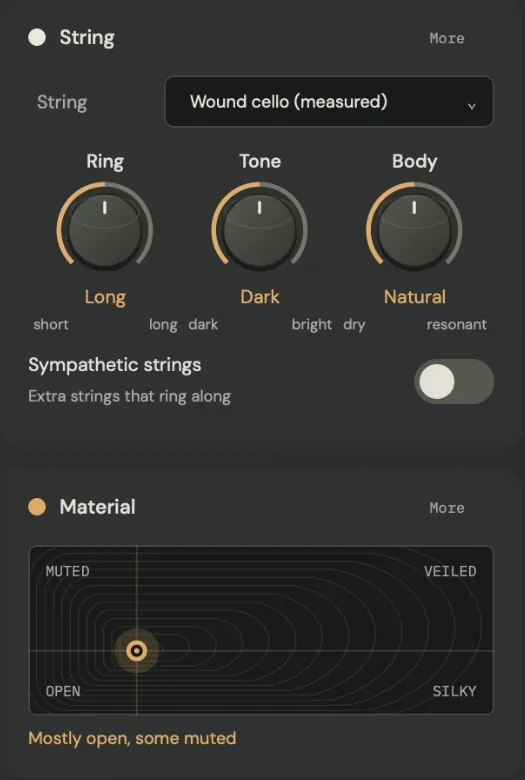
More
Each card has a More button. It opens a drawer with the rest of that part’s controls, grouped under one- or two-word headings. Only the controls the program uses are shown. Notes keep sounding while a drawer is open; Escape, the × or a click outside closes it.

The keyboard strip
Five octaves of keys, a pitch wheel and a mod wheel, and a row of the playing settings that belong to them.
| Section | What it holds |
|---|---|
| KEYS | ‹ C1 – C6 › moves the keyboard by octaves. |
| TRANSPOSE | Semitones and Fine (cents). |
| VOICING | Poly with the number of Voices, or Mono with its glide: Legato only or Always, and the glide time. |
| BEND | The pitch-wheel Range and MPE on or MPE off. |
| VELOCITY | How velocity plays the note: Strength and Touch on a plucked or struck instrument, or Dynamics and Colour on a bowed one. |
Click or drag on the keys to play; the height you strike a key at sets the velocity. Every sounding note lights its key, including notes from your host. On a section, each lit key shows how many players are on it. Notes from the editor’s keyboard sound, but your host does not record them: play your MIDI keyboard to record.
The footer
- Modulation ↗ opens the Modulation page, full screen.
- Effects ↗ opens the effects rack. Click it again to return.
- The version, and a one-line explanation of the control under the mouse.
- PANIC silences every voice, tail and effect at once, without changing the program.
Keyboard and mouse
- Drag a knob up or down; hold Shift for fine control. The mouse wheel nudges it.
- Double-click a knob to restore its default; double-click its value to type one.
- Tab moves the focus, the arrow keys change the focused value (Shift and an arrow for fine steps), Enter opens numeric entry and Escape closes a drawer.
- Every control your host automates moves on screen.
The Library
Click the preset box in the header and the Library opens over the page; click it again, or Close, to return.
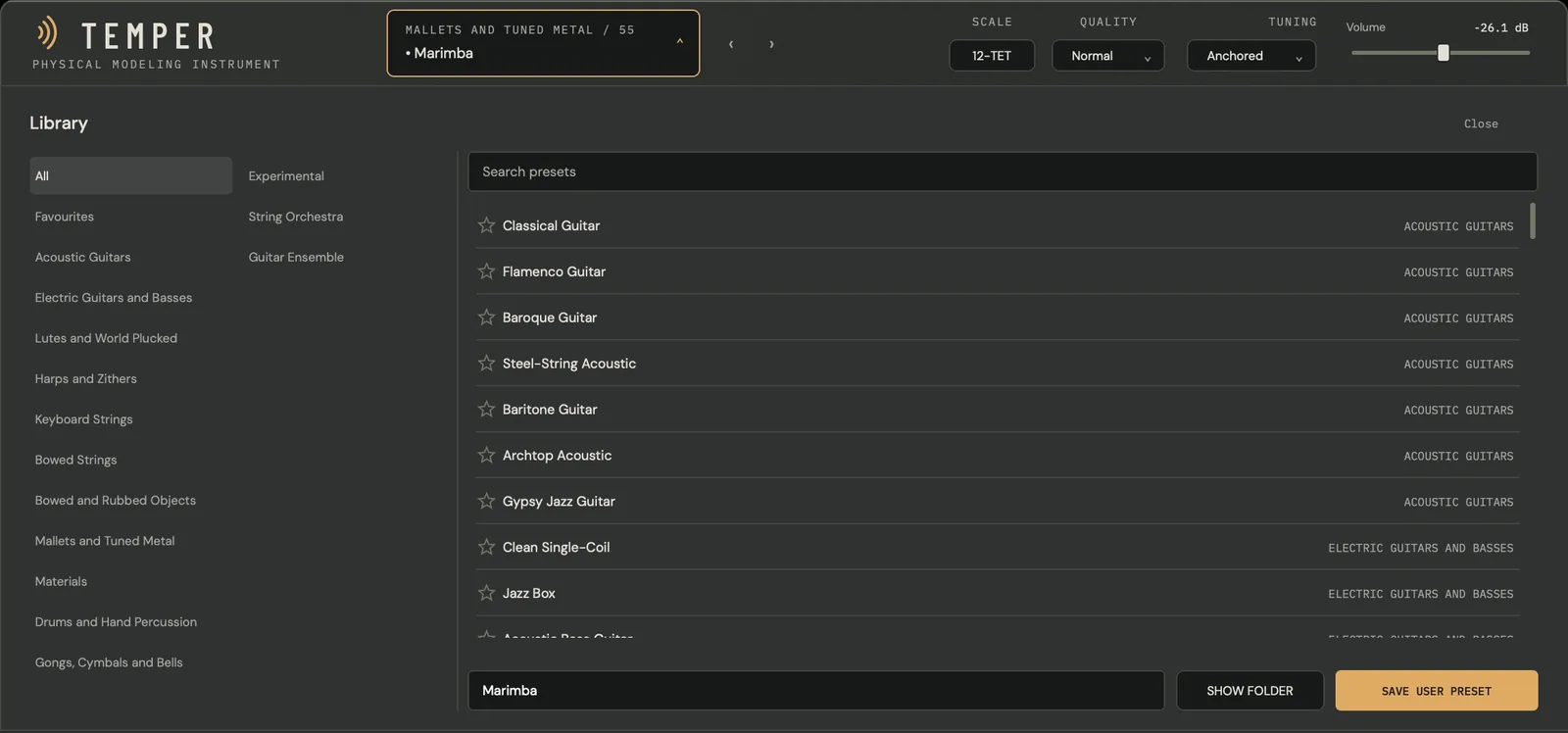
- The left column lists All, Favourites, the fourteen families and your own User presets.
- Search presets filters by name and family. Click a program to load it; click its star to add it to Favourites.
- At the foot, type a name and press SAVE USER PRESET to store the current sound; SHOW FOLDER opens the folder it was saved to,
~/Library/Audio/Presets/E8 Audio Labs/TEMPER.
The families
| Programs | Family | For example |
|---|---|---|
| 1–7 | Acoustic Guitars | Classical Guitar, Flamenco Guitar, Steel-String Acoustic, Gypsy Jazz Guitar |
| 8–15 | Electric Guitars and Basses | Clean Single-Coil, Jazz Box, Acoustic Bass Guitar, Fretless Bass |
| 16–26 | Lutes and World Plucked | Mandolin, Oud, Banjo, Bağlama |
| 27–34 | Harps and Zithers | Concert Harp, Koto, Guzheng, Gayageum |
| 35–39 | Keyboard Strings | Grand Piano, Harpsichord, Clavichord, Hammered Dulcimer |
| 40–50 | Bowed Strings | Violin, Cello, Col Legno, Double Bass Pizzicato |
| 51–54 | Bowed and Rubbed Objects | Bowed Cymbal, Bowed Tam-tam, Bowed Steel Plate |
| 55–64 | Mallets and Tuned Metal | Marimba, Vibraphone, Tubular Bells, Gamelan Gendèr |
| 65–68 | Materials | Head Materials, Glass Sheet, Glass Rods, Brass Tubes |
| 69–88 | Drums and Hand Percussion | Floor Tom, Snare Drum, Djembe, Cajón |
| 89–97 | Gongs, Cymbals and Bells | Tam-tam, Ride Cymbal, Church Bell, Singing Bowl |
| 98–103 | Experimental | Ten-Metre Monochord, Aeolian Harp, Bell Cloud, Rain on Tin |
| 104–110 | String Orchestra | Violins I · 8 players, Violas · 6 players, Cellos · 6 players, Basses · 4 players |
| 111–115 | Guitar Ensemble | Classical Guitars I · 4 players, Bass Guitars · 2 players |
Every program has four macros, each named for what you hear, and a material pad with two named axes and four named corners. At 0 a macro leaves the program as voiced.
Playing from a keyboard
- Velocity sets how hard each note is played. On the bowed strings it sets the bow’s dynamics and colour instead.
- The mod wheel (CC1) moves the material pad’s vertical axis. On some programs it also turns the first macro, which then carries the wheel mark; on most bowed strings and bowed sections that macro is Vibrato.
- Sustain (CC64) holds notes, whatever Release says.
- Channel and polyphonic pressure, CC74 and an MPE slide are expression sources. On the plucked and hammered strings, CC74 or a slide moves where a sounding note is played.
- Breath (CC2), Expression (CC11), Foot (CC4) and two assignable controllers (CC16 and CC17 by default) are sources for modulation.
- MPE is on by default. Channel 1 is the master channel and channels 2 to 16 are members, so each note can carry its own bend, pressure and slide.
- The pitch wheel bends ±2 semitones in every factory program; set the range under BEND.
Some programs sound away from the key, as their real counterparts do; Transpose shows it. Floor Tom, for example, reads −12 st.
A first ten minutes
- Load Acoustic Bass Guitar. Click the preset box, choose Electric Guitars and Basses and click Acoustic Bass Guitar. Play a line.
- Move where you pluck. Drag the Where slider toward the middle, or drag the point on the picture. The words follow you.
- Change the tool. Try Pick, then Nail. A pick lets go of the string almost at once, so the note is brighter and snappier.
- Let it ring. Turn Release from stopped toward let ring, play a chord and lift your hands.
- Turn the macros. Mute lays a hand on the strings; Ring lengthens the note.
- Move the material pad. Push the mod wheel up: the pad moves from Fingers toward Muted. Drag across to Picked and Thump.
- Step through the families. Try 35 Grand Piano, 55 Marimba, 69 Floor Tom and 94 Church Bell, and watch the page redraw for each instrument.
- Open a section. Load 107 Cellos · 6 players and click Stage.
- Save it. Open the Library, type a name, and press SAVE USER PRESET.
Where next
- Tutorials: hands-on walks through plucking, striking, bowing, the Stage, Orchestrate, the Modulation page and the effects rack.
- Technical guide: the reference for programs, the material pad, tuning, voices, expression, modulation, the Stage, the effects rack, TEMPER FX, your DAW and troubleshooting.
- Glossary: every control you see, with its range and what it does.